Despina Petrushevska
Sugar-free diet food list
Download your free sugar-free diet food list A two-page checklist of sugar-free ...

Last Updated: Nov 2, 2026
Free PDF 3 pages, print-ready Clinician-reviewed
Download your free fitness assessment form A ready-to-use fitness assessment form covering client and emergency contact details, medical history, physical health information, fitness goals, an open fitness evaluation section, and training preferences. Download template What is a fitness assessment form? A fitness assessment form is a client intake and evaluation document that personal trainers, gym […]
A ready-to-use fitness assessment form covering client and emergency contact details, medical history, physical health information, fitness goals, an open fitness evaluation section, and training preferences.
Start from scratch, or upload this PDF or any form you already use, and Pabau's AI Form rebuilds it with tick boxes, text fields and a signature. Attach it to the treatment once, and every patient gets it on time.
AI Form rebuilds the consent, history and aftercare forms you already use. You review each one, then publish.
Patients complete forms on their phone before they arrive, so the front desk stops retyping paper.
Every signed form is versioned and attached to the treatment record, ready when you need it.
Set how long a consent stays valid. Returning patients skip forms they have already signed.
Supports HIPAA and GDPR compliance AES-256 encryption 4.8 on G2 4.7 on Capterra Trusted by 4,000+ practices worldwide

A fitness assessment form is a client intake and evaluation document that personal trainers, gym owners, and fitness coaches use to record health history, physical health information, and fitness goals before building a personalized training program.
A complete fitness assessment form covers client and emergency contact details, medical history and lifestyle habits, physical health information (height, weight, BMI, body fat percentage), an open fitness evaluation section, and training preferences.
A thorough intake helps you spot health risks and injury history early, so you can build a program that fits the client’s needs and goals safely.
Practice management software like Pabau offers digital intake forms and customizable questionnaires that streamline fitness assessment workflows, auto-populate client records, and cut down on paper-based admin in wellness and personal training businesses.
A fitness assessment form is a client intake and evaluation document that personal trainers, gym owners, fitness coaches, and other practitioners use at the start of a client relationship. It captures personal and emergency contact details, medical history, physical health information, and fitness goals, then leaves room for you to record your own fitness evaluation — muscular strength, muscular endurance, cardiovascular endurance, and flexibility — plus the client’s training preferences. The form gives you a consistent starting point for every new client: a written baseline you can refer back to and compare future progress against.
A good intake form matters at any practice size. It documents what the client told you about their health and goals, which helps you build a program that fits them and gives you a record to point back to if their goals or health picture changes. Whether you run a private studio, a gym.
A baseline captures one point in time, so the weeks between assessments need a record of their own. A free exercise log keeps a dated note of each session, which gives the next assessment something to compare against.
A fitness assessment form built around this template covers six areas: client and emergency contact details, medical history, physical health information, fitness goals, an open fitness evaluation section, and training preferences.
The medical history section is where you capture anything that could affect how a client trains. It asks about current and past medical conditions, injuries, and surgeries, current medications, and lifestyle habits such as smoking, alcohol, and recreational drug use. It also asks about sleep, typical diet, and current stress level and its sources — factors that shape recovery and training capacity just as much as a fitness score does.
If something in a client’s answers raises a flag — a heart condition, a recent surgery, or a medication that affects exercise tolerance — it’s good practice to suggest they check with their physician or primary care provider before you start testing. The form doesn’t lock you into one screening protocol, so you can apply whatever clearance process your practice already follows.
An occupational therapy platform can store each completed scale beside the patient’s goals and session history.
The physical health section captures height, weight, BMI, and body fat percentage, plus whether the client is currently training — with a trainer, independently, or not at all — and how. These fields give you an objective starting point before you get into fitness testing.
This section also asks clients to select their physical health goals directly on the form: weight loss, muscle gain, general fitness, improved sports performance, or overall health. Knowing the goal upfront means you can shape the fitness evaluation and the training program around what the client actually wants, rather than a generic template.
Unlike the rest of the form, the fitness evaluation section doesn’t prescribe a specific test. It gives you five open fields — muscular strength, muscular endurance, cardiovascular endurance, flexibility, and other — so you can record the results of whichever tests you already use in your practice. That might be a push-up test and a timed plank for strength and endurance, a sit-and-reach test for flexibility, and a short cardio test — a step test, a timed run, or however you currently measure conditioning — for cardiovascular endurance. Because the fields are open text rather than fixed scales, you can use the same form for a first-time gym member or a competitive athlete without redesigning it.
Overhead athletes sometimes describe a shoulder that slips or catches, which the open evaluation fields will not settle. The load and shift test grades that translation, and it belongs after the history and strength testing rather than before.
Administering the fitness assessment form correctly gets you accurate baseline data and a client who feels heard from the first session.
A fitness assessment form like this is useful for personal trainers running one-on-one or group sessions, gym owners who want every trainer using the same intake process, wellness and lifestyle coaches building programs around a client’s goals, and physical therapists or other practitioners who want a general client intake to sit alongside their clinical notes. It works well anywhere a trainer or coach needs a client’s health background, physical health information, and fitness goals before writing a program.
Safety and documentation: A completed medical history and lifestyle section means you’re not starting a training relationship blind. If a client discloses a heart condition, a recent injury, or a medication that affects exercise tolerance, you can factor that in — or recommend they check with a physician — before you push them through a workout.
Personalized programming: Knowing a client’s goals, current activity level, and physical health information upfront means you can shape their program from day one, instead of running everyone through the same starter routine and adjusting later.
Progress tracking and motivation: Repeating the form every few weeks or months gives you a written comparison point — new fitness evaluation notes next to the old ones, an updated weight and body fat percentage, a goal that’s shifted from “lose weight” to “build strength.” Notes and numbers motivate far more than a subjective “you’re doing great.” Capturing client feedback alongside the fitness evaluation also shows you which parts of a program are landing, so you can refine what you offer. A rehab practice reporting outcomes to a payer needs consistent measures, not narrative summaries.
Documentation and consistency: A completed, signed, and dated form is proof that you collected a client’s health background and goals before starting them on a program. That’s useful if a client’s memory of what was discussed differs from yours, and it keeps every trainer in a multi-location gym working from the same intake process.
Decide which fitness tests you’ll use to fill in the evaluation section — for example a push-up test, a sit-and-reach test, and a short cardio test — before you hand this form to a new client, and stick with the same ones for repeat assessments. The form leaves the tests open on purpose, but your results only mean something if you measure the same way every time.
Paper fitness assessment forms have been the industry standard for decades, but digital forms are rapidly replacing them in professional fitness and wellness settings. Here’s why the shift matters.
Paper forms: Low cost upfront, familiar to older clients, no technical setup required. Downsides are significant: handwriting is hard to read, data entry into client records is manual and error-prone, lost forms mean lost data, and paper files take up physical storage space. If you ever need to check whether a form is on file and signed, you’re hunting through filing cabinets to find it.
Digital forms: Clients complete assessments on iPad or web portal before arrival. Data flows directly into the client record with zero manual transcription error. Conditional logic auto-skips questions (e.g., if a client selects no medications, the medication list field disappears). Digital forms carry automatic time-stamps and audit trails, so you can see exactly when and how a form was completed. The system stores historical versions automatically, letting you track changes across repeated assessments.
The downside: digital forms require internet connectivity and a client-facing system, which smaller gyms or solo trainers may not have. Cost is the barrier — practice management software with digital forms is an investment.
This is where digital automation becomes a game-changer. Rather than printing paper assessment forms and manually transferring results into client records, Pabau’s digital intake forms and customizable questionnaires let personal trainers and wellness business staff build a fitness assessment form once, send it to clients digitally, and have all responses populate the client record automatically — no manual data entry, no lost forms, no transcription errors.
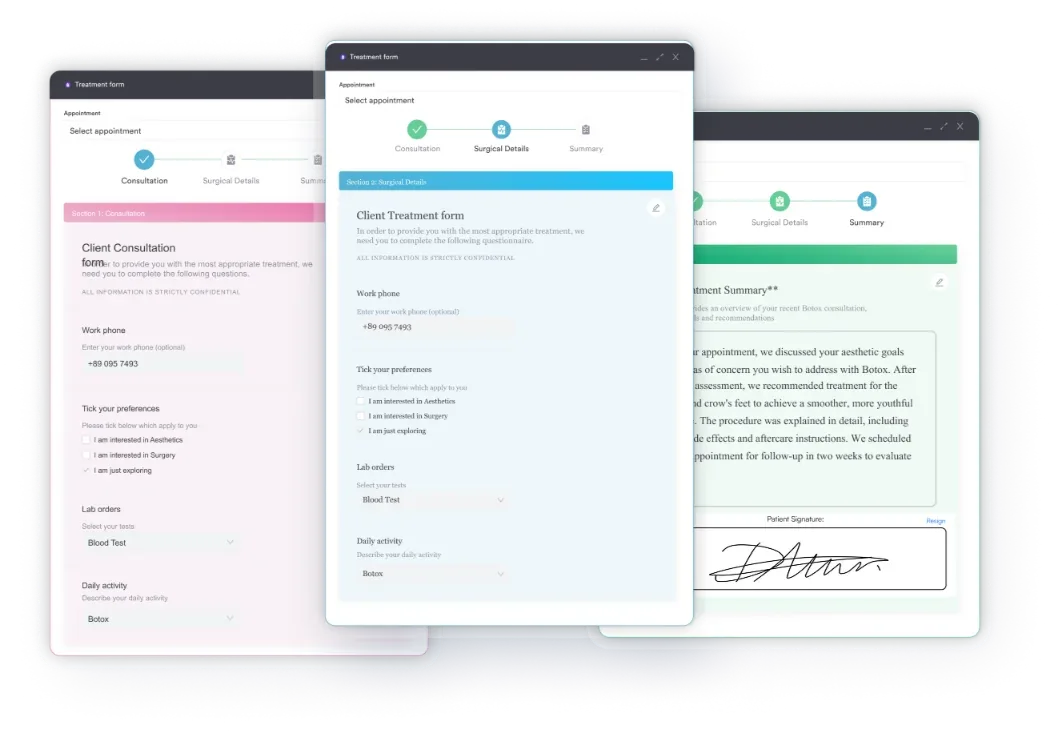
Clients complete the assessment on their phone or tablet before their first appointment, so trainers arrive to a fully populated health history and baseline information. Conditional logic skips irrelevant questions based on client responses (if a client reports no health conditions, medication fields disappear). Repeat assessments trigger prompts comparing new results to baseline — so after 12 weeks of training, you can instantly show the client how their fitness evaluation notes, weight, or body composition have changed, alongside photos and other notes. This creates a closed-loop progress-tracking system that motivates retention and justifies program pricing.
For multi-location gyms or sports medicine practices, Pabau centralizes all client assessments in one system, so any staff member can access baseline fitness data regardless of location — eliminating redundant re-assessments and keeping the intake process consistent across every location.
A fitness assessment form gives personal trainers and gym owners a consistent way to collect client health history, physical health information, and fitness goals before building a program. Whether you use it on paper or digitally, it’s the baseline you’ll compare every future result against. Digital automation cuts out manual data entry, speeds up client onboarding, and makes it easy to track progress over months and years. Book a demo to see how Pabau’s customizable intake forms and automated client records streamline fitness assessment workflows.

Building out the fitness evaluation section? Arm curl test scoring sheets give you a repeatable protocol for logging muscular strength and endurance results.
Tracking outcomes across occupational therapy sessions? The Canadian Occupational Performance Measure form rates importance, performance, and satisfaction across re-evaluations.
Treating dizziness linked to neck pain? The cervicogenic dizziness exercises template guides therapeutic movements for dizziness that originates from cervical spine dysfunction.
A fitness assessment form should include client and emergency contact information, medical history, physical health information (height, weight, BMI, body fat percentage), fitness goals, an open fitness evaluation section (muscular strength, muscular endurance, cardiovascular endurance, flexibility, and other), and training preferences.
No. The fitness evaluation section is intentionally open-ended, so you can record results from whichever tests your practice already uses, such as a push-up test, a timed plank, a sit-and-reach test, or a short cardio test, rather than following one fixed protocol.
Repeat fitness assessments every 8-12 weeks for clients in active training programs, and annually for maintenance clients. Use shorter intervals, such as every 4 weeks, for weight-loss or rehabilitation clients who need closer progress tracking.
Not exactly. A basic gym intake form usually only captures administrative details, such as name, contact information, and membership type. A fitness assessment form goes further, adding medical history, physical health information, fitness goals, and an open fitness evaluation section, so trainers have a fuller picture before building a program.
Not for every client. If a client’s medical history shows something like heart disease, high blood pressure, or a recent injury or surgery, it’s good practice to ask them to check with their physician or primary care provider before starting a new exercise program. If nothing in their history raises a concern, you can move ahead based on what they’ve told you.
The physical health section captures height, weight, BMI, and body fat percentage, along with the client’s current activity level and their physical health goals, such as weight loss, muscle gain, or improving overall fitness.