Anja Dodevska
Cytocare consent form
Cytocare is a hyaluronic acid-based mesotherapy skin booster from Revitacare, in...

1
Last Updated: Oct 27, 2026
Free PDF 2 pages, print-ready Clinician-reviewed
An esthetician consent form is a signed document that records a patient's informed agreement before a facial, peel or other skin treatment. It captures personal details, health history, medications and allergies, the risks of the planned treatment, aftercare expectations and a release of liability. The patient and the esthetician sign and date it before each new treatment, and again whenever the patient's health history changes. This free PDF template covers each of those sections. The guide that follows explains what to write in them, where state rules differ and how to store signed forms.
A two-page form with sections for personal details, treatment details, medical history and potential risks. It closes with a consent and liability release statement, plus patient and esthetician signature lines.
Start from scratch, or upload this PDF or any form you already use, and Pabau's AI Form rebuilds it with tick boxes, text fields and a signature. Attach it to the treatment once, and every patient gets it on time.
AI Form rebuilds the consent, history and aftercare forms you already use. You review each one, then publish.
Patients complete forms on their phone before they arrive, so the front desk stops retyping paper.
Every signed form is versioned and attached to the treatment record, ready when you need it.
Set how long a consent stays valid. Returning patients skip forms they have already signed.
Supports HIPAA and GDPR compliance AES-256 encryption 4.8 on G2 4.7 on Capterra Trusted by 4,000+ practices worldwide

An esthetician consent form records a patient’s informed agreement before each skin treatment.
Cover personal details, health history, medications, allergies and the risks of the specific treatment.
Requirements vary by state cosmetology board, so check local rules before relying on the form.
Liability waivers reduce exposure but cannot remove liability for gross negligence.
Ask the patient to sign again whenever the treatment or their health history changes.
An esthetician consent form is a signed document in which a patient confirms they understand a proposed treatment. It covers the treatment’s risks, its limits and the aftercare expected of them.
The form sits alongside the intake form, which gathers background information, and turns that information into a documented decision to proceed.
Its clinical purpose is to show that the patient was told what the treatment involves before it started. Its legal purpose is to create a dated record that can be reviewed if a complaint or claim arises later.
A signed form shows that the esthetician asked the right questions before treating the patient. That record matters most when a reaction, complaint or dispute occurs weeks after the appointment.
A practical template groups its fields into five sections, summarized in the table below. Each one should be short enough for a patient to complete on a tablet at reception.
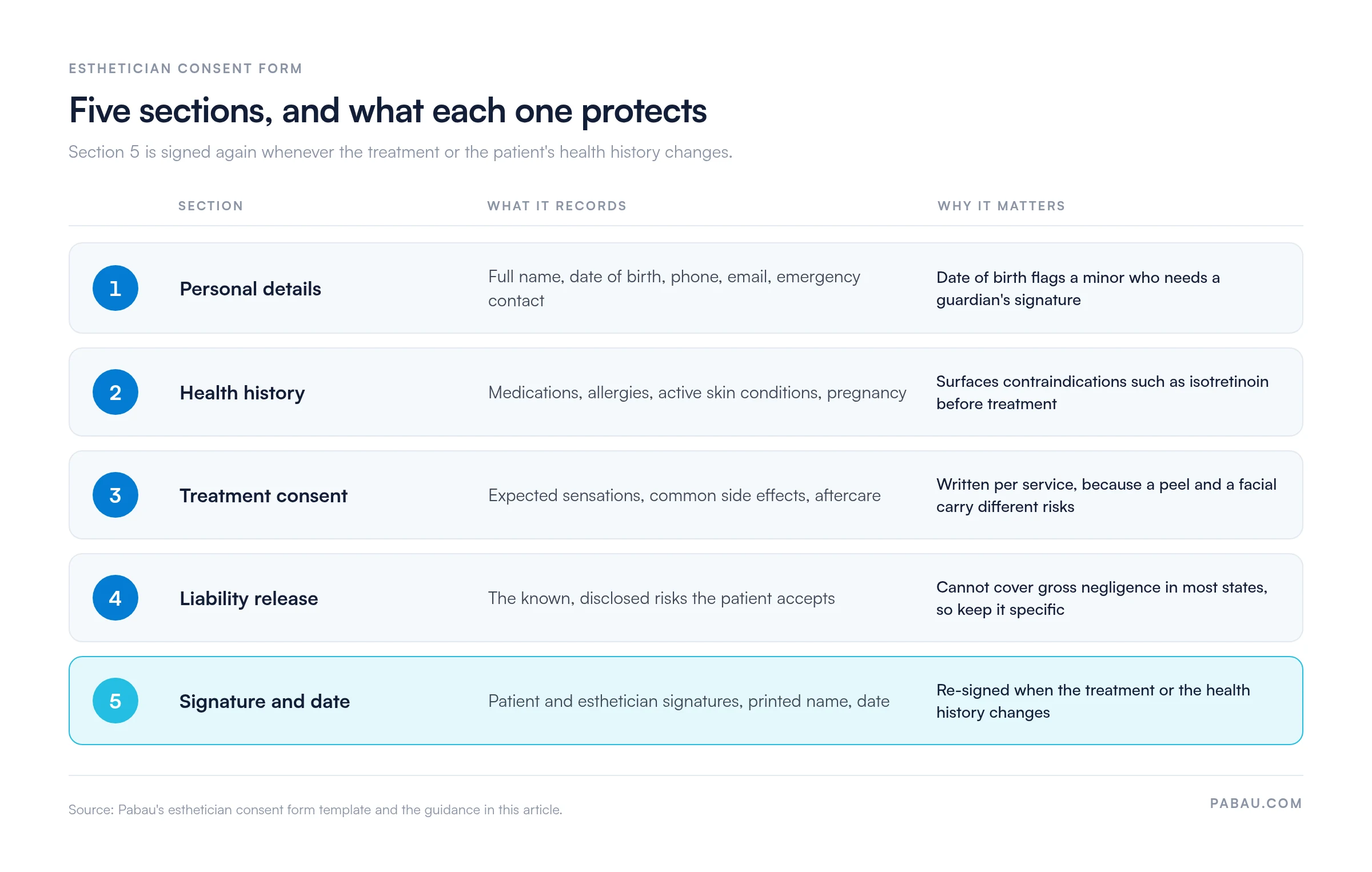
Capture full name, date of birth, phone, email and an emergency contact. Date of birth matters because minors need a parent or guardian signature, and state rules on age thresholds differ.
This section is where skin condition disclosure and contraindication screening happen. Ask about the following, and record each answer as a yes or no with detail where needed.
Record skin type as well. A Fitzpatrick skin type chart gives every practitioner on your team the same scale to record it.
If a patient answers yes to a medication such as isotretinoin, do not treat until the position is clarified. Decisions on contraindications should follow current guidance from Associated Skin Care Professionals (ASCP) and, where relevant, the patient’s physician.
Boilerplate alone is not enough. A facial, a chemical peel and microdermabrasion carry different risks, so each needs its own consent statement covering expected sensations, common side effects and aftercare. An acne treatment consent form shows how that wording reads for a single service.
A release clause should state the risks the patient accepts and release claims for known, disclosed risks. It cannot protect against gross negligence or willful misconduct in most states, so keep the wording specific rather than sweeping.
If you take before-and-after photos, ask for permission in writing. Use separate checkboxes for the patient record and for marketing, so a patient can agree to one without the other.
Include a signature line, a printed name and a date for every treatment. Ask the patient to sign again when the treatment changes or their health history changes.
An intake form collects information, while a consent form records agreement. Practices often use both, and the distinction helps you decide which section a question belongs in. For skin services, a facial consultation form covers the intake side before consent is signed.
HIPAA applies to covered entities such as healthcare providers that bill electronically, health plans and clearinghouses, along with their business associates.
Many independent estheticians and salons are not covered entities, so HIPAA does not automatically apply. Confirm your status with HHS guidance on covered entities before adding HIPAA wording.
Whatever your HIPAA status, treat health history as sensitive. Store completed forms securely, limit access to staff who need it and keep backups in a secure location.
A printed PDF works for a small practice, but it relies on manual filing and handwritten signatures. Digital forms capture the same fields on a tablet and store them against the patient record.
Electronic signatures are broadly valid under the federal E-SIGN Act, but some state rules are stricter for health-related records. Check your state’s requirements before you switch.
Use the template as a starting point and adapt it to the treatments you offer. Five steps keep the process consistent.
Have the template reviewed against your state cosmetology board’s rules, and keep a current copy for each treatment type.
Licensed estheticians in independent studios use it for every facial and skin service. Salon and spa owners use it to standardize consent across a team. Skin practices and med spas use it where esthetic treatments overlap with clinical procedures.
A shared template keeps consent consistent between practitioners. It also speeds up reviews, because every file follows the same structure and shows which version the patient signed.
Audit your consent form once a year. Check that the treatment list, contraindications and aftercare still match what your team offers. Date each revision so you can show which version a patient signed.
On paper, consent means printing the form, collecting a signature at reception, then scanning or filing it by hand. Finding the signed version months later means searching folders, and a missed re-sign is easy to overlook.
Pabau, the software for med spas and skin practices we build, sends intake and consent forms to patients before they arrive. Signed forms attach to the patient record automatically, next to treatment notes and before-and-after photos.
Pabau’s digital forms let each treatment carry its own consent template, so a peel and a facial never share one generic statement. Your front desk stops chasing signatures on the day, and every signed version keeps its date.

Pabau’s digital forms collect intake and consent before the appointment and file each signed form against the patient record.

Start with the template, then make it yours. Add consent wording for each service you offer, and have the final version checked against your state cosmetology board’s rules.
The form protects you only while it stays current. A patient who starts isotretinoin or books a new peel should sign again before that appointment.
Paper is manageable while your patient list is small. Once you re-sign forms every week, a digital workflow saves front desk time and keeps each version traceable. Book a demo to see how Pabau sends, collects and files consent forms for your skin services.

Assessing skin before you plan treatment? Skin assessment form records skin type, concerns and history at the first visit.
Need notes that match the signed consent? Skin peel treatment notes shows how to document a peel session step by step.
Using patient photos in your portfolio? Model waiver form explains when a separate photo release is needed.
Planning the business side of your studio? Is a skin care business profitable? breaks down margins, costs and business models.
An esthetician consent form is a signed record showing that a patient understands a treatment’s risks, limits and aftercare before it begins.
Requirements vary by state cosmetology board, so check your local rules. A consent form is widely used because it documents disclosure and agreement.
It can be enforceable as evidence of agreement. It does not protect against gross negligence or willful misconduct in most states.
Yes. Electronic signatures are broadly valid under the federal E-SIGN Act, though some state rules for health records are stricter.