

CCSD code XR940: Foreign body retrieval billing guide
CCSD code XR940 is the UK private healthcare code for retrieval of a foreign bod...

Last Updated: Nov 26, 2026
CCSD code XR920 is the UK private healthcare code for cyst ablation under imaging control. It sits in Chapter 17, “Other”, of the CCSD schedule, at sub-chapter 17.13.0. Imaging guides the treatment of the cyst, so this is an interventional procedure, not a diagnostic X-ray.
The fact that matters most at billing time is the clash list. The CCSD names four cyst operations that can’t share a claim with XR920: A3830, B1012, C4100 and T9400. Pair the wrong codes and the insurer is likely to query or reject the claim. The sections below cover the record you need, the Healthcode workflow and a quick check to run before you submit.

CCSD code XR920 is cyst ablation under imaging control, in Chapter 17 (Other), sub-chapter 17.13.0 of the CCSD schedule.
It’s an interventional procedure guided by imaging, so a diagnostic scan on its own never qualifies.
The CCSD lists A3830, B1012, C4100 and T9400 as unacceptable combinations with XR920.
The record should show both the ablation and the imaging that guided it, in a signed procedure note.
Insurers set their own pre-authorization and submission rules, so confirm them before the procedure.
CCSD code XR920 describes cyst ablation under imaging control. The clinician uses imaging to guide treatment of the cyst, instead of opening the area surgically to reach it. The CCSD places the code in Chapter 17, “Other”, under sub-chapter 17.13.0.
The CCSD Group maintains the schedule, and UK private medical insurers such as Bupa, AXA Health, Aviva and Vitality use it. Practices submit the codes through Healthcode’s eBilling platform or on invoices, depending on their insurer agreements. For how the wider code set works, see our guide to CCSD codes for practices.
The descriptor names two elements: the ablation of a cyst, and imaging control during the procedure. It doesn’t name a body site, an imaging modality or an ablation method. Confirm the full descriptor in the CCSD schedule or your insurer’s code lookup before you bill.
The insurer checks the record for two facts. An ablation happened, and imaging guided it. Without that evidence, a claim is likely to be queried, even when the code is right.
Before billing XR920, make sure these are on file:
The CCSD lists four codes as unacceptable combinations with XR920. Each one is a separate operation on a specific type of cyst. Billing one alongside an imaging-guided ablation could describe the same lesion being treated twice.
So which code goes on the claim? The procedure note settles it, as the decision path below shows.
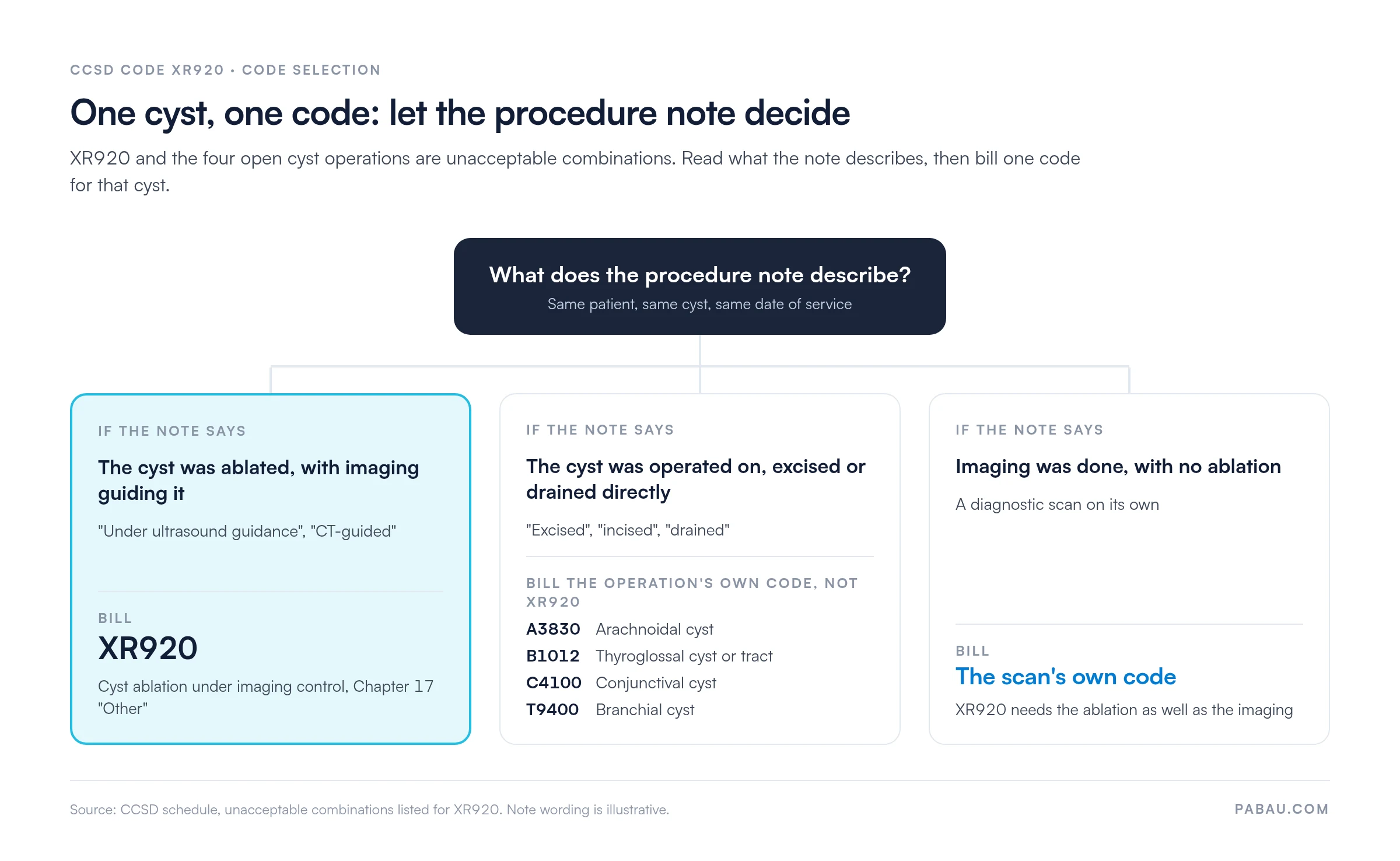
If the cyst was ablated under imaging, bill XR920. If it was operated on, excised or drained directly, bill the code for that operation instead. Bupa’s code lookup lets you check a descriptor before you submit.
Read the procedure note before you pick the code. Words like “under ultrasound guidance” or “CT-guided” alongside an ablation point to XR920. Words like “excised”, “incised” or “drained” point to the specific operation code for that cyst.
Say a draft invoice carries XR920 and T9400 for a neck cyst on the same date. That pair is on the CCSD clash list, so the claim is likely to come back.
Open the procedure note. If it records an ultrasound-guided ablation, keep XR920 and delete T9400. If it describes an open operation on a branchial cyst, keep T9400 and drop XR920. Either way, one procedure on one cyst gets one code.
Every UK private medical insurer sets its own rules for pre-authorization, submission deadlines and supporting documents. These differ by plan type and change over time. Confirm the current position with the insurer, or in your provider agreement, before the procedure.
Where the insurer requires pre-authorization, the process usually runs like this:
Bupa adds rules of its own, which our Bupa CCSD billing guide covers. The CCSD Group sets codes rather than fees, so check the Bupa procedure fee schedule for what Bupa pays.
Healthcode is the main eBilling platform for UK private healthcare, and many insurer claims for CCSD codes run through it. A standard submission takes seven steps:
Keep the Healthcode submission reference. You’ll need it if the claim is queried or appealed.
Run these questions against the invoice and the record before the claim leaves the practice. A “no” to any of them is worth fixing first.
Most XR920 rejections trace back to a handful of repeatable errors. Here are the common ones, with a fix for each.
A rejection isn’t always final. Each insurer runs its own reconsideration process, so check its provider guidance for the steps and time limits.
Set a reminder 60 days after every XR920 submission. If the claim hasn’t been paid or queried by then, follow it up with the insurer. Chasing early is easier than asking for a late-submission exception.
Billing XR920 by hand means tracking authorization numbers, insurer rules and code clashes across separate systems. Each handover is another chance for a claim to go out incomplete.
Pabau, a practice management platform, sends CCSD claims to UK insurers through its claims software for practices, which connects to Healthcode. The claim is built from the same patient record that holds the procedure note. Required fields, such as membership and authorization numbers, are checked before the claim can be sent.
Your team stops rekeying details between systems, and fewer claims bounce over a missing reference. Claim status shows up on the record too, so follow-ups don’t rely on a separate spreadsheet.

Pabau sends CCSD claims through its Healthcode integration and checks required fields first, so claims for codes like XR920 go out complete.

XR920 rewards a careful read of the procedure note. When the note shows an ablation guided by imaging, you’re billing a cyst ablation under imaging control from Chapter 17, not a diagnostic X-ray. When it shows an open operation, the operation’s own code takes priority.
After that, most of the risk sits in process. A missing authorization number, an unsigned note or a late invoice can stall a correctly coded claim. Build the five-point check into your billing routine, and those claims are far less likely to come back.
Book a demo to see how Pabau sends CCSD claims through Healthcode from the same record as your procedure notes.

Draining a conjunctival cyst directly? CCSD code C4100 covers drainage of a conjunctival cyst, one of the codes that can’t be billed with XR920.
Excising a thyroglossal cyst? CCSD code B1012 explains the open excision code and its billing rules.
Billing other CCSD codes for Bupa? Bupa CCSD billing guide covers pre-authorization and submission rules for Bupa-covered procedures.
Need the Bupa fee schedule? Bupa procedure codes fee schedule gives an overview of how Bupa prices CCSD-coded services.
No. XR920 is cyst ablation under imaging control, filed in Chapter 17, “Other”, of the CCSD schedule. Imaging guides a treatment here, so it isn’t a diagnostic X-ray.
No single fee applies. The CCSD Group sets the codes and their descriptors, while each insurer and provider agrees the fee. Check the payer’s own fee schedule for what it pays for XR920.
The full CCSD schedule is searchable on the CCSD website once you register and log in. Bupa also runs its own code lookup, which helps you check a descriptor before you bill.
OPCS-4 is the NHS classification for procedures. CCSD codes describe care billed to private insurers and self-pay patients. The CCSD aims to align with NHS coding principles, but the two sets differ in places.
Each insurer sets its own deadline, and it can vary by plan. Check your provider agreement and invoice soon after treatment. If you miss the window, ask the payer in writing whether it will still consider the claim.