Klara handles patient messaging well. It also sits outside the clinical record, so notes live in one system, forms in another, and reminders in a third. Each integration needs maintenance, the subscriptions stack up, and the front desk still works across three screens.
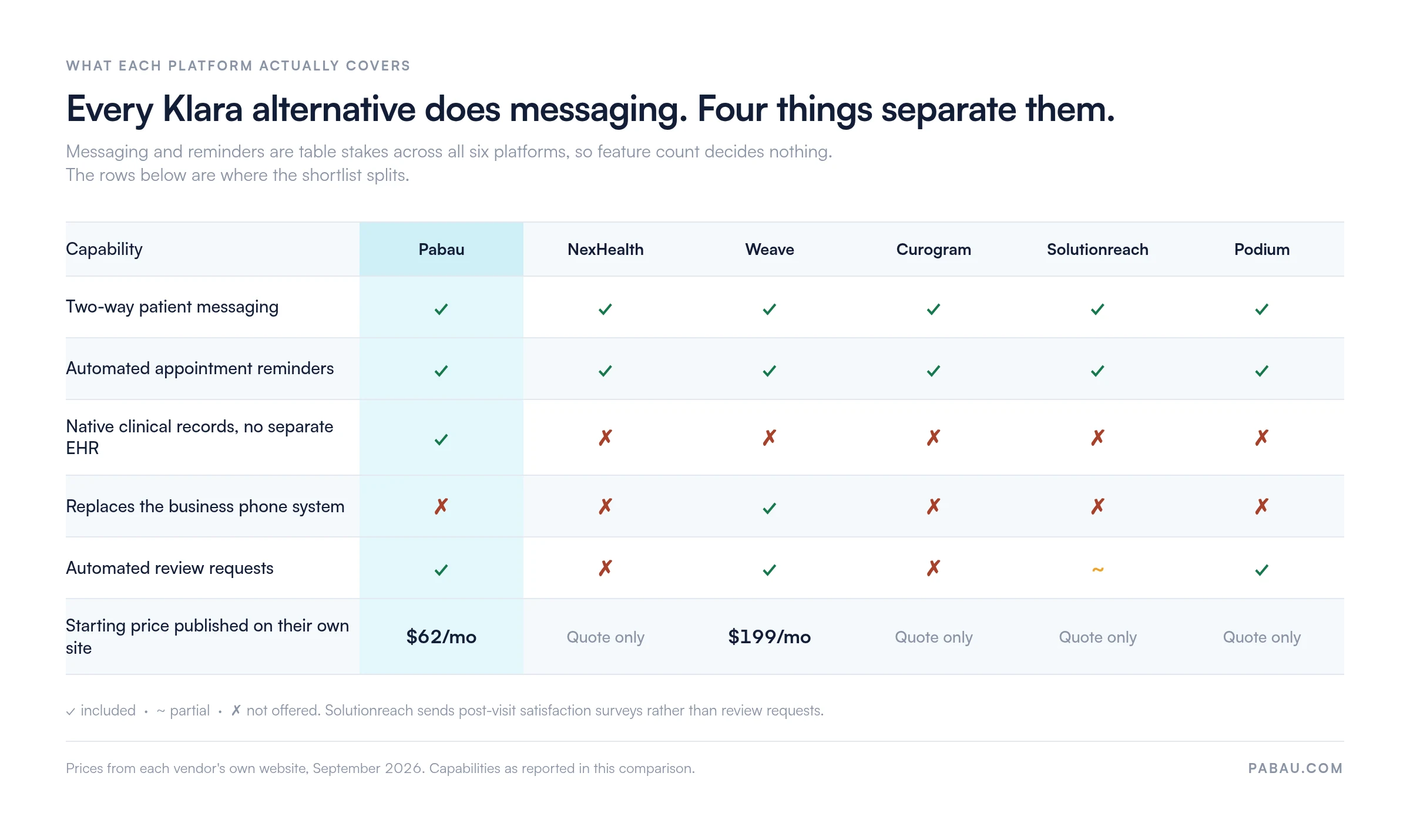
The six platforms below all send two-way texts and automated reminders. That is where the similarity ends. Only one carries native clinical records. Only one replaces the phone system. Only two publish a starting price. Those four splits decide a shortlist, not the feature list.
Practice management software like Pabau is the pick for practices that want messaging and the clinical record in one subscription. The rest of this guide covers where each of the other five fits better, and what each one costs to find out.
Found our content helpful?
Klara alternatives at a glance
Six platforms, compared on the criteria practices raise most often: HIPAA compliance, two-way texting, EHR integration, automated reminders, and starting price. Ratings are the Capterra score for each vendor.
Platform
Best for
Standout feature
Starting price
Capterra rating
Pabau
Aesthetic, wellness, and multi-specialty practices
All-in-one: EHR + messaging + reminders + portal
From $62/month
4.7/5 (650)
NexHealth
Practices prioritizing scheduling and engagement
Deep EHR integration and online scheduling
Contact for pricing
4.7/5 (31)
Weave
Practices needing integrated VoIP and texting
Unified phone system with two-way texting
From $199/month
4.3/5 (~670)
Curogram
Smaller practices focused on HIPAA texting
HIPAA-compliant two-way patient texting
Contact for pricing
5.0/5 (41)
Solutionreach
Practices running patient recall campaigns
Patient relationship management and recall
Contact for pricing
3.8/5 (236)
Podium
Practices prioritizing review generation
Review management with patient messaging
Contact for pricing
4.3/5 (522)
1. Pabau — Best Klara alternative for clinical records and patient messaging
Rating4.7/5★★★★★Top pick
The bottom line
Pabau is the only platform here that keeps patient messaging and the clinical record in one system.
Who it’s for
Aesthetic, wellness and multi-specialty practices
Practices that need consent forms and treatment photos
Owners replacing an EHR and a messaging tool at once
Fewer ready-made templates for dental and optometry
More setup time than a single-purpose tool
Pabau is a full practice management platform built for aesthetic, wellness, and multi-specialty private practices. It is the EHR itself, rather than a messaging layer sitting on top of one. Communication, clinical notes, consent forms, scheduling, and automated reminders all share the same patient record.
Messages and notes read from one database, so there is no integration to configure or repair. That matters for practices running injectables, skin procedures, or IV therapy. Consent records and treatment notes have to line up with what the patient was told by text, and here they sit on the same timeline.
Key features
Automated appointment reminders: SMS and email automated appointment workflows fire at intervals you set, cutting no-shows without manual follow-up
Two-way patient messaging: Staff and patients exchange messages inside the platform, and every thread is logged against the patient record
Patient portal: Patients use their own patient portal to manage bookings, complete forms, and read messages, with no separate app to download
Digital intake forms: Forms go out before the appointment and return straight to the patient record, with no paper step
Review automation: Post-appointment review requests send themselves, so reputation building needs no second tool
Clinical documentation: Treatment notes, before-and-after photos, consent records, and injection plotting all live in the same platform
Multi-location support: Centralized management across sites, with reporting broken out per location
Pre- and post-care messaging: Care instructions send automatically before and after treatment, keyed to the specific service booked
Where Pabau shines
No integration overhead: Patient communication is native to the platform, so there are no API keys, sync failures, or second vendor contracts
Specialty-specific features: Consent management, before-and-after photos, and treatment records were built for aesthetic and private healthcare rather than adapted from a generic base
All-in-one pricing: Communication features come with the practice management subscription instead of being sold as an add-on
Automated review collection: Review prompts sit inside the post-appointment workflow, so a separate reputation tool is not needed
HIPAA-compliant data handling: Encryption and access control cover the whole clinical record, not only the messaging layer
Where Pabau falls short
Built around aesthetic and private healthcare: Dental and optometry practices will find fewer specialty templates ready out of the box
No standalone VoIP phone system: Pabau does not replace a business phone line the way Weave does. Practices that need calls and texts in one console should price Weave separately
Onboarding takes longer: The breadth of the platform means new users invest more setup time than they would with a single-purpose messaging tool
Customer reviews
Pabau holds 4.7/5 from 657 verified reviews on Capterra. Reviewers consistently highlight the breadth of the platform and running a whole practice from one login. Criticism centers on the initial learning curve while teams get comfortable with the full feature set.
Who Pabau is best for
Aesthetic and medical spa software users who need clinical documentation alongside patient communication
Multi-specialty private practices tired of running separate tools for records, messaging, and reminders
Practices that want automated review collection inside the post-appointment workflow
Practices scaling to several locations that need patient communication managed centrally
Pricing
Plan
Price
What it covers
Starter
From $62/month
One user, up to 100 clients
Solo
Contact for pricing
One user, unlimited patients
Team
Contact for pricing
Two to three users, unlimited patients
Medium
Contact for pricing
Four to five users
Group
Contact for pricing
Six to fifteen users
Enterprise
Contact for pricing
Sixteen or more users, multi-location
Every tier includes every feature, and the rate depends on your region and user count. Published rates for the US, UK, Canada, Australia, and the EU sit on Pabau’s pricing page.
2. NexHealth — Best for EHR-integrated scheduling
Rating4.7/5★★★★★
The bottom line
NexHealth is the strongest pick when scheduling data has to stay in step with the EHR in real time.
Who it’s for
Dental and general medical practices
Practices with an EHR they will not replace
High-volume front desks
Teams that want patients self-booking
PricingContact for pricingquoted by product mix and practice size
NexHealth works the scheduling and engagement side of patient communication. Its strength is depth of EHR integration: the platform reads directly from and writes back to a wide range of dental and medical systems. That makes it the most technically robust option here for practices where booking data and clinical records must not drift apart.
Key features
Online scheduling: Patients book from a live availability widget, and confirmations write back to the EHR
Two-way patient messaging: HIPAA-compliant text messaging between staff and patients
EHR synchronization: Direct read and write access across a broad EHR library, with appointment status reflected in the record automatically
Automated appointment reminders: Reminder sequences by SMS and email, configurable per appointment type
Digital forms: Pre-visit intake sent by text, completed online, returned to the EHR
Recall campaigns: Automated outreach to patients due for a follow-up
Where NexHealth shines
A strong EHR integration library, particularly for dental and general practice settings
Real-time two-way scheduling sync, which cuts double-booking and the admin rework that follows it
A clean patient-facing experience for online booking and form completion
Where NexHealth falls short
Pricing sits higher than most options here, and every quote needs a sales call
Configuring the EHR integration properly takes time and technical support
No built-in clinical documentation, so a separate EHR is still required
Customer reviews
NexHealth holds 4.7/5 from 31 reviews on Capterra, a small sample compared with the older vendors here. Reviewers praise the quality of the EHR integration and the scheduling automation. Complaints cluster around setup complexity and support response times during onboarding.
Who NexHealth is best for
Dental and general medical practices with an EHR that needs better scheduling and engagement tools on top
Practices with high appointment volume, where real-time scheduling sync is operationally critical
All six products, quoted from your practice details
NexHealth publishes no prices. Its own site runs a calculator instead: you pick the products you want, enter your practice details, and it returns a quote by email.
3. Weave — Best for VoIP and two-way patient texting
Rating4.3/5★★★★★
The bottom line
Weave is the only option here that replaces the practice phone system as well as the texting.
Who it’s for
Practices with heavy inbound call volume
Front desks juggling calls and texts
Practices replacing an aging phone system
Dental, optometry and veterinary practices
PricingFrom $199/monththree tiers, quoted per practice
Weave pairs a VoIP business phone system with patient messaging, which makes it the most complete phone-plus-texting option on this list. Where the front desk fields a high volume of calls and also sends texts, Weave puts both channels in one console. An inbound call brings the patient record up on screen, so staff can take the call and follow up by text without switching platforms.
Key features
VoIP phone system: A full business phone replacement with call routing, voicemail, and call recording, bundled with the top Ultimate tier
Two-way patient texting: SMS from the Weave interface, tied to the caller record
Automated appointment reminders: Reminder sequences by text and email, configurable per appointment type
Online scheduling: Patient self-scheduling, included from the entry tier up
Payment collection: Text-to-pay for sending invoices and taking payment over SMS
Review requests: Automated review prompts sent by text after the appointment
Where Weave shines
The only option here that replaces a business phone system, so calls and texts stop living in two places
Caller ID pulls the patient record automatically, giving staff context before they pick up
Text-to-pay simplifies post-visit collection without a separate payment link
Where Weave falls short
The VoIP handsets that make Weave worth buying only come with the top Ultimate tier, so the entry price understates the cost
Reviewers report multi-year commitments and price rises at renewal, so negotiate the term before signing
No clinical documentation or EHR functionality, so a separate clinical system is still required
Customer reviews
Weave earns 4.3/5 from around 670 reviews on Capterra and 4.6/5 from 426 reviews on G2. Reviewers repeatedly name the phone-plus-texting integration as the reason they chose it. Contract terms and renewal pricing draw the most frustration.
Who Weave is best for
Practices handling high call volumes that want calls and texts managed in one interface
Practices replacing an aging business phone system at the same time as adding patient messaging
Elite plus VoIP phones for up to 15 handsets, missed-call texting, 15,000 bulk texts
Weave publishes $199 a month as its starting point and quotes each tier individually. Read the tier list carefully before you budget: the VoIP handsets only arrive with Ultimate, two steps above the advertised entry price.
4. Curogram — Best for HIPAA-compliant two-way texting
Rating5.0/5★★★★★
The bottom line
Curogram does compliant two-way texting and little else, which suits a small practice fine.
Who it’s for
Small and mid-size practices
Practices that already have an EHR
Teams that want a fast implementation
Practices sending recall broadcasts
PricingContact for pricingquoted after a demo request
Curogram is the most focused platform on this list. It does HIPAA-compliant two-way patient texting, and it does that well. The product is built for practices that already run an EHR and a practice management system and need a compliant messaging layer on top. Setup is fast and the feature set is deliberately narrow, which works in its favor for smaller teams.
Key features
HIPAA-compliant two-way texting: Patient messaging with a BAA available, and every message encrypted and logged
Automated appointment reminders: SMS reminder sequences with configurable timing and message templates
EHR integration: Connects to a range of EHR systems to pull patient contact details and appointment data
Broadcast messaging: Bulk messages to patient groups for announcements or recall outreach
Digital forms: Basic pre-visit intake forms
Where Curogram shines
Setup is faster than the broader platforms here, so a practice can be live quickly
Solid HIPAA-compliant texting with a BAA available
High satisfaction scores from smaller practices with straightforward messaging needs
Where Curogram falls short
The feature set stops at texting, so it will not cover review management, VoIP, or clinical documentation
A smaller support team than the larger vendors, which can stretch resolution times at scale
Less suited to practices with multi-location or high-volume communication needs
Customer reviews
Curogram scores 5.0/5 from 41 reviews on Capterra, the smallest review base in this comparison. Reviewers consistently praise the texting reliability and the compliance handling. Most criticism concerns feature depth for practices that want more than messaging.
Who Curogram is best for
Small and mid-size practices that already run a clinical system and need compliant two-way texting only
Practices where fast implementation is the priority
Pricing
Plan
Price
What it covers
All plans
Contact for pricing
Quoted after a demo request
Curogram publishes no prices and no plan names. Every pricing question on its own site routes to a demo booking, so budget for a sales conversation before you get a number.
5. Solutionreach — Best for patient recall campaigns
Rating3.8/5★★★★★
The bottom line
Solutionreach has the deepest recall tooling here, and the oldest interface to go with it.
Who it’s for
Dental and general medical practices
Practices with large recall lists
Teams running long-term patient outreach
Practices that survey after every visit
PricingContact for pricingfour tiers, SMS allowance per tier
Solutionreach has worked in patient communication for over two decades, which shows in the depth of its recall and relationship tooling. Most platforms here stay close to the appointment: reminders, confirmations, post-visit follow-up. Solutionreach goes further with segmented recall campaigns, health newsletters, and long-term engagement. The trade-off is an interface that feels dated next to newer entrants.
Key features
Patient recall campaigns: Automated outreach to overdue patients, segmented by treatment type and time since the last visit
Automated appointment reminders: SMS, email, and voice reminders with configurable sequences
Two-way texting: HIPAA-compliant messaging in both directions
EHR integration: Connects to a range of EHR and practice management systems
Patient satisfaction surveys: Post-visit surveys that surface unhappy patients before they post a public review
Health newsletters: Branded patient education emails that keep contact going between visits
Where Solutionreach shines
Recall campaigns run deeper than anywhere else on this list, particularly for dental and general medical practices
A long-standing EHR integration library built over two decades of operation
Satisfaction surveys help practices catch problems before they turn into public reviews
Where Solutionreach falls short
The interface is dated relative to newer platforms, and the user experience shows its age
Annual contracts with limited flexibility draw a consistent reviewer complaint
Customization options fall short of what practices with complex communication workflows tend to need
Customer reviews
Solutionreach scores 3.8/5 from 236 reviews on Capterra and 4.3/5 from 169 reviews on G2, the lowest Capterra score in this comparison. Reviewers value the recall tooling but consistently flag the interface. Contract terms and limited customization draw the most complaints.
Who Solutionreach is best for
Dental and general medical practices with high recall volumes, where automated long-term outreach is the main need
Practices willing to trade a modern interface for deeper recall campaign functionality
Pricing
Plan
Price
What it covers
Patient Connect
Contact for pricing
Entry tier, 1,750 SMS a month
Practice Efficiency
Contact for pricing
Larger monthly SMS allowance
Practice Growth
Contact for pricing
Larger monthly SMS allowance again
Enterprise
Contact for pricing
Six or more locations, tailored allowance
Solutionreach names four tiers on its own site but prices none of them. It does publish the monthly SMS allowance per tier, which starts at 1,750 messages. Compare that against your own text volume before you request a quote.
6. Podium — Best for online reviews and patient messaging
Rating4.3/5★★★★★
The bottom line
Podium generates Google reviews better than anything else here, but it was not built for healthcare.
Who it’s for
Practices where review volume is the priority
Multi-location businesses wanting one inbox
Teams happy with their existing clinical system
Practices fielding messages from several channels
PricingContact for pricingquoted by location and add-ons
Podium started as a reputation management platform and added patient messaging later. Where generating Google reviews is the problem to solve, it has a clear edge.
The review request workflow is polished and tied into Google Business Profile. It collects far more reviews than asking at the front desk. The messaging side works, but the platform is not healthcare-specific, and the absence of clinical features shows.
Key features
Review generation: Automated post-appointment review requests tuned for Google and Facebook, with direct links that cut friction
Two-way texting: Patient messaging by SMS from a central inbox the whole team shares
Website chat: An embedded chat widget that routes visitor messages into the same inbox as the texts
Automated appointment reminders: SMS reminder sequences configurable per appointment type
Payment collection: Text-to-pay for post-visit invoices
Where Podium shines
Review generation is the strongest of any platform here, and particularly well tuned for Google
A central team inbox covering SMS, web chat, and Facebook Messenger in one place
A large user base across industries, and a polished, mature interface to match
Where Podium falls short
Not healthcare-specific, so it lacks clinical features and its EHR integrations run shallow
Expensive for smaller practices, particularly where review management is the only use case
HIPAA compliance depends on specific configuration, so it is not HIPAA-ready out of the box the way healthcare-native platforms are
Customer reviews
Podium holds 4.6/5 from 2,049 reviews on G2 and 4.3/5 from 522 reviews on Capterra, the largest review base in this comparison. Reviews single out review generation as the reason practices sign up. Cost and the absence of healthcare-specific features draw the most criticism.
Who Podium is best for
Practices where building Google reviews is the main business objective and messaging comes second
Multi-location businesses that want one inbox across sites and channels
Pricing
Plan
Price
What it covers
All plans
Contact for pricing
Built for your business after a sales conversation
AI Employee add-on
Contact for pricing
Optional add-on layered on any plan
Podium lists plan tiers on its own site without attaching a price to any of them, and its AI Employee add-on is quoted separately. Expect a higher price point than the single-feature tools here.
How Pabau compares to Klara feature by feature
For a practice moving off Klara specifically, the question is what you gain and what changes. This table covers the criteria practices weigh up when they switch.
Feature
Klara
Pabau
Two-way patient messaging
✅ Core feature
✅ Built in, logged to the record
HIPAA compliance and BAA
✅ Stated, confirm the BAA
✅ Platform-wide
Automated appointment reminders
✅ Available
✅ Configurable workflows
EHR and clinical records
❌ Requires an external EHR
✅ Native EHR included
Digital intake forms
⚠️ Via integration
✅ Native, returns to the record
Patient portal
⚠️ Limited
✅ Full self-service portal
Review automation
❌ Not a core feature
✅ Built into the post-visit flow
VoIP phone system
❌ Not included
❌ Not included
Starting price published
❌ Not listed publicly
✅ From $62/month
Aesthetic and wellness features
❌ Not specialized
✅ Consent, before and after, injection plotting
Per the HHS Office for Civil Rights, any vendor handling protected health information on behalf of a covered entity must sign a Business Associate Agreement. Confirming that a BAA is available is the first compliance checkpoint, before any demo or feature comparison.
Pro Tip
Before you request a single quote, ask each vendor two questions. Does a HIPAA BAA come as standard rather than a paid upgrade, and is your current EHR on their integration list? Both answers will cut your shortlist in half before you sit through a demo.
How to choose the right platform for your practice
Feature count is the wrong way to pick. Every platform here claims HIPAA compliance, two-way texting, and automated reminders, so those rows tell you nothing.
What decides the choice is the role communication plays in your workflow, and whether you are willing to run two systems to get there. The comparison below shows where the six actually diverge.
Messaging and reminders look identical across all six platforms, so the bottom four rows are where a shortlist is decided. Prices come from each vendor’s own site.
Start with the integration question. If your EHR is non-negotiable, check which platforms support a native integration with it before you look at anything else. NexHealth and Curogram have strong coverage of common EHR systems. Pabau is the EHR, so there is no integration to worry about.
Decide whether you need VoIP. Weave is the only platform here that replaces your business phone system, and only on its top tier. If call volume is a problem alongside messaging, price it properly. If you only need messaging and reminders, do not pay for a phone system.
Weigh how much reviews matter. If Google reviews are holding growth back, Podium is purpose-built for that job. If reviews are a nice-to-have, both Pabau and Weave include review request automation inside their broader feature sets.
Look at your clinical documentation. If you run treatments that need consent forms, before-and-after photos, or detailed treatment records, no communication tool will solve that. Only Pabau covers clinical documentation and patient communication in the same platform.
Check the contract terms before you sign. Reviewers report multi-year commitments at Weave and annual terms at Solutionreach. If your headcount or volume is likely to move, shorter terms reduce lock-in risk. Pabau’s pricing scales with users and locations, which is easier to forecast.
Working through those five questions usually leaves two platforms standing. Our practice software comparisons put the pairs practices weigh up most often side by side. That settles the last decision faster than sitting through two more demos.
How Pabau replaces Klara and the EHR underneath it
A practice on Klara today keeps two records of the same patient. The message thread lives with the vendor and the clinical note lives in the EHR, so staff copy context between them. Consent forms arrive by a third route, and the reminder schedule is configured somewhere else again.
Pabau, our practice management platform, holds all of it against one patient record. A text, a booking, an intake form, a treatment note, and a before-and-after photo attach to the same person. Pre-care and post-care messages send off the service that was booked, rather than off a spreadsheet somebody has to maintain.
The outcome is one subscription, one login, and no integration to keep alive. Every Pabau subscription includes every feature, so patient messaging is never an upgrade you pay extra for. If you want the counter-argument, our round-up of Pabau competitors is honest about where other platforms fit better.
Patient messaging and clinical records on one record
Book a personalized demo to see how aesthetic and wellness practices replace a standalone messaging tool with Pabau. Every patient touchpoint lands on the same record.
The choice comes down to how many systems you are willing to run. Klara and four of the six options here are communication layers. They assume a clinical system underneath and a working integration between the two.
If that arrangement already holds together, a focused tool like Curogram or a phone-first one like Weave will cost far less than a rebuild. If the integration is what keeps breaking, swapping one messaging layer for another will not fix it.
Practices in aesthetics, wellness, and multi-specialty care usually land on the second answer. Book a demo to see the messaging, reminders, and clinical records your team would stop reconciling by hand.
Continue your research
Replacing the EHR rather than the messaging layer?DrChrono alternatives compares the platforms medical practices shortlist when the clinical system itself is the problem.
Running an aesthetic or med spa practice?PatientNow alternatives reviews the platforms built for consultations, consent, and before-and-after photography.
Comparing all-in-one practice platforms?SimplePractice competitors lines up the broader systems that cover records, scheduling, and messaging together.
Frequently asked questions
What is the best alternative to Klara for medical practices?
The right choice depends on what your current setup is missing. Pabau is the strongest option for practices that need clinical documentation, consent management, and patient messaging in one platform. NexHealth suits practices prioritizing EHR-integrated scheduling. Weave is best for those needing VoIP alongside texting. Curogram works well for smaller practices that want reliable HIPAA-compliant texting with a fast setup.
Is Klara HIPAA compliant?
Klara is widely described as HIPAA compliant, and comparison pages confirm that a Business Associate Agreement is available. HIPAA compliance is not a certification, though. It is a set of requirements met through proper configuration and a signed BAA. Confirm BAA availability with the vendor directly, and check that your own configuration meets HHS requirements before you handle patient data through it.
How much does Klara cost?
Klara does not publish pricing publicly, which is a common frustration for practices evaluating it. Pricing needs a conversation with its sales team and varies by practice size and feature tier. That opacity is one reason practices go looking for a platform with clearer pricing. Pabau publishes a starting price of $104 a month at pabau.com/pricing, which helps when you are building a software budget.
Does Pabau offer patient communication features like Klara?
Yes. Pabau includes two-way patient messaging, automated appointment reminders, digital intake forms, a patient portal, pre- and post-care messaging, and automated review requests. None of it requires a separate communication tool. The difference from Klara is that these features belong to a full EHR and practice management system. They are not a messaging layer added on top of a separate clinical system.
What is the difference between Klara and NexHealth?
Both are standalone patient communication platforms that integrate with an external EHR. NexHealth’s differentiator is deeper scheduling integration. It reads from and writes back to EHR appointment data in real time, which Klara does not match. NexHealth typically suits practices where keeping the EHR and patient-facing booking in step is the highest priority.
Is there a free alternative to Klara?
No widely used free platform matches Klara on HIPAA-compliant two-way texting and automated reminders. Free tools in this space usually lack BAA availability or the reliability clinical use demands. On a tight budget, the more useful question is which platform offers the best value against what it replaces. A purpose-built communication tool usually saves enough manual admin time to justify its cost.