Pabau Engage inbox

Pabau Engage is here: every patient conversation in one inbox.

Learn more
Book a demo Book a demo
☰
Compare

5 Best hair transplant clinic software in the US (2026)

Avatar photo Katy Piper
Last Updated: October 2, 2026
Reviewed by: Avatar photo Lucy Galloway

Hair transplant clinic software has to follow one patient for 12 to 18 months, from the first consultation to the final growth photo. It also has to hold four-to-six-hour FUE sessions and take deposits on surgery patients pay for themselves.

We compared five platforms on those jobs. Practice management software like Pabau is our top pick for practices that pair hair restoration with injectables, skin or other aesthetic services. PatientNow suits surgery-led practices that want financing built in.

Get the choice wrong, and your surgeons end up keeping graft counts in a spreadsheet next to the software you paid for. The table below scores all five, and six demo tests follow the reviews.

Key takeaways
Found our content helpful?

Key takeaways

1. Pabau — best for practices that run hair restoration alongside injectables, skin and other aesthetic services in one patient record.

2. PatientNow — cosmetic surgery EMR with graft-count note templates, RxPhoto imaging and CareCredit and Cherry financing built in.

3. AestheticsPro — strong photo timelines and e-prescribing for aesthetic practices willing to configure their own graft fields.

4. Nextech — enterprise pick for large plastic surgery groups that bill insurance for reconstruction cases.

5. DrChrono — iPad-first charting with insurance and cash-pay billing for tech-forward surgical practices.

How the five platforms stack up on hair restoration work

The table scores each platform on hair restoration workflows rather than generic practice management features. Starting prices come from each vendor’s own website, and ratings come from Capterra.

Name Best for Standout feature Starting price Rating
PabauMulti-specialty practices running FUE, FUT and PRP alongside aesthetic servicesCustom form builder for graft counts and donor zones, plus before-and-after photo timelinesFrom $62/month (one user, full platform)4.7/5 (Capterra, 651 reviews)
PatientNowCosmetic surgery practices that want imaging and patient financing in the EMRGraft-count note templates, RxPhoto integration, plus CareCredit and Cherry financingCustom quote (no published pricing)3.9/5 (Capterra, 297+ reviews)
AestheticsProAesthetic practices built around photo documentation and e-prescribingTimeline photo management with side-by-side comparison viewsFrom $160/month (Pro-Plus, two users)4.4/5 (Capterra, 650+ reviews)
NextechLarge plastic surgery groups with high patient volumesCloud EMR with integrated CRM and revenue cycle managementCustom quote (no published pricing)4.1/5 (Capterra, 239+ reviews)
DrChronoTech-forward practices mixing insurance and cash-pay casesiPad-native EHR with customizable forms and an open APICustom quote (no published pricing)4.0/5 (Capterra, 490+ reviews)

This list is ordered by fit for practices that combine hair restoration with aesthetic services, not by overall rating. Prices and ratings come from each vendor’s own site and Capterra, checked September 2026.

Pabau: Best when hair restoration shares a calendar with aesthetics

Rating4.7/5★★★★★Top pick
The bottom line

Pabau keeps FUE and FUT charting, aesthetic bookings and cash-pay billing on one patient record.

Who it’s for
  • Practices pairing FUE or FUT with injectables, skin or PRP
  • Multi-location hair restoration groups
  • Cash-pay practices taking deposits and payment plans
  • Owners replacing three or more separate tools
PricingFrom $62/monthone user, full platform
What works
  • Graft, donor and recipient fields configured with Pabau during onboarding
  • Before-and-after photo timelines on the patient record
  • Every subscription includes every feature
What doesn’t
  • Graft templates are built during onboarding, not preloaded
  • No offline mode, needs a stable connection

Pabau is an all-in-one practice management system that runs surgical and non-surgical hair restoration in one EMR. A single patient record holds the FUE or FUT surgical note, the PRP series and the 12-month follow-up photos.

Practices build graft-count, donor-density and recipient-zone fields with Pabau’s form builder. The same builder hosts a standardized hair transplant intake template for medical history and contraindication screening. When we onboard hair restoration practices, the surgical note is usually the first template we build, because every follow-up report reads from it.
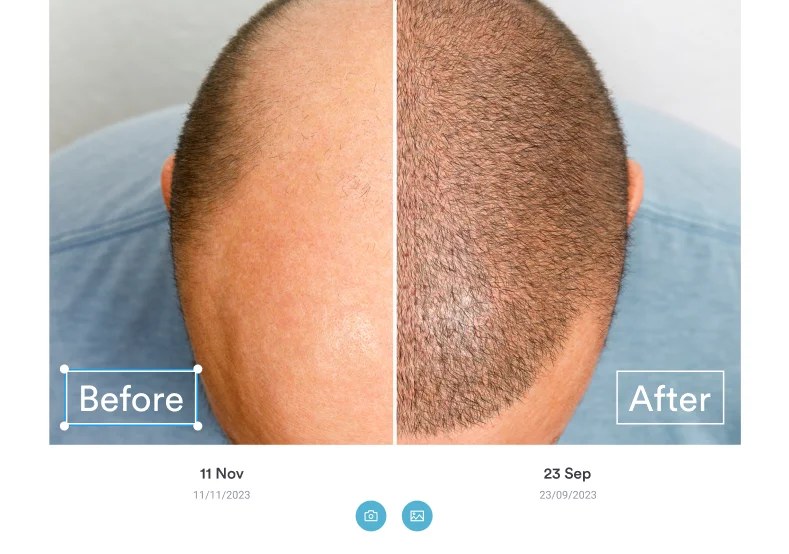
Pabau before-and-after photo comparison showing a patient's crown before a hair transplant and after regrowth, with capture dates under each image
Pabau’s photo comparison lines up the consultation crown shot against the same angle at follow-up, so each growth conversation rests on dated images.

A surgery day in Pabau, step by step

Scheduling, clinical notes, payments and marketing all run in the same system. Here’s how one FUE case moves through it:

  1. Booking: The front desk books the surgery block and takes the deposit in one screen.
  2. Pre-op: Instructions go out by SMS and email without anyone typing them.
  3. Surgery: The surgeon records graft counts, donor zones and technique on the surgical note.
  4. Follow-up: Recall reminders bring the patient back, and each photo lands beside the consultation shot.

Patient data sits in one HIPAA-compliant database instead of four vendor accounts.

Pabau client card showing a patient's appointments, medical history, medications and allergy alerts on one screen
Pabau’s client card puts medical history, medications and allergy alerts on one screen, so the surgical team checks contraindications before surgery day.

Key features that carry the surgical note

  • Customizable clinical forms: Build procedure-specific consent templates, medical history questionnaires and post-operative care instructions without developer help.
  • Before-and-after photo management: Capture standardized images with angle markers, timeline tracking and side-by-side comparison views inside the patient record.
  • Injection plotting tool: Mark treatment sites on a face chart or an uploaded client photo, recording product, units and batch details — adapted here for scalp photos, since Pabau has no dedicated scalp diagram.
  • Multi-location calendar: Schedule surgical blocks across treatment rooms with practitioner availability, equipment allocation and procedure duration settings.
  • Cash-pay billing: Take deposits, set up payment plans and send quotes for cosmetic procedures.
  • Automated patient communications: Send pre-operative instructions, aftercare protocols and recall reminders by SMS and email.
  • Inventory tracking: Monitor surgical supplies, anesthetic agents and post-operative medications with usage-based reorder alerts.
  • HIPAA-compliant architecture: Keep encrypted patient records with role-based access controls and a full audit trail.

Where Pabau pulls ahead for hair restoration

  • Procedure-specific workflows: Teams document FUE extractions and FUT harvesting with templates configured with Pabau during onboarding to capture graft counts, donor zones and technique.
  • One operational platform: Scheduling, EMR, billing, inventory and marketing sit in one system, so there’s no vendor stack to maintain.
  • Multi-specialty flexibility: Pabau adapts to hair restoration, aesthetic dermatology, plastic surgery and med spa workflows without a second software purchase.
  • Payment plan automation: Cash-pay billing handles deposit collection, installment scheduling and balance tracking for high-value procedures.

Where Pabau asks for patience

  • Setup time: Pabau’s structured onboarding configures forms, automations and permissions over roughly four to six weeks, so it isn’t a same-day switch.
  • Staff training: Front desk and clinical teams take longer to learn the full feature set than a scheduling-only tool.
  • No offline mode: Pabau is cloud-based, so patient records and the calendar need a stable internet connection.

What 651 Capterra reviewers say about Pabau

Pabau holds a 4.7 out of 5 rating on Capterra from 651 reviews. Reviewers praise the all-in-one approach and the customizable clinical workflows. On G2, reviewers single out before-and-after photo management and multi-location support.

Pricing: From $62 a month, with every feature included

PlanPriceUsersKey inclusions
Starter
$62/month1 user, up to 100 patientsFull platform
Solo
[TODO: add Solo price]1 user, unlimited patientsFull platform
Team, Medium, Group
Quoted by user count2 to 15 usersFull platform
Enterprise
Custom quote16+Full platform, multi-location support

Pabau prices by location and number of users, and every plan includes the full platform. Larger teams get a quote based on their exact user count.

PatientNow: Best for surgery-led practices that sell on financing

Rating3.9/5★★★★★
The bottom line

PatientNow is a cosmetic surgery EMR with graft-count note templates, RxPhoto imaging and patient financing built in, suited to surgery-led practices.

Who it’s for
  • Cosmetic surgery practices adding hair transplants
  • Cash-pay practices that want CareCredit and Cherry at checkout
  • Solo surgeons and small surgical groups
PricingCustom quoteno published pricing
What works
  • Surgical note templates with graft-count and donor-area fields
  • RxPhoto standardized before-and-after imaging
  • Financing built into the payment flow
What doesn’t
  • Donor density mapping needs custom configuration
  • Multi-location support needs extra setup

PatientNow is a practice management and EMR platform built for cosmetic surgery, plastic surgery and medical aesthetics. Its architecture assumes cash-pay cosmetic workflows from the ground up. That’s why it ranks second here, ahead of the medspa-first AestheticsPro.

Take a patient who consults about FUE and hesitates at the price. The coordinator offers CareCredit or Cherry financing without leaving the checkout. RxPhoto has already captured standardized consultation photos, and the surgical note template records graft counts and donor-area assessments on the day.
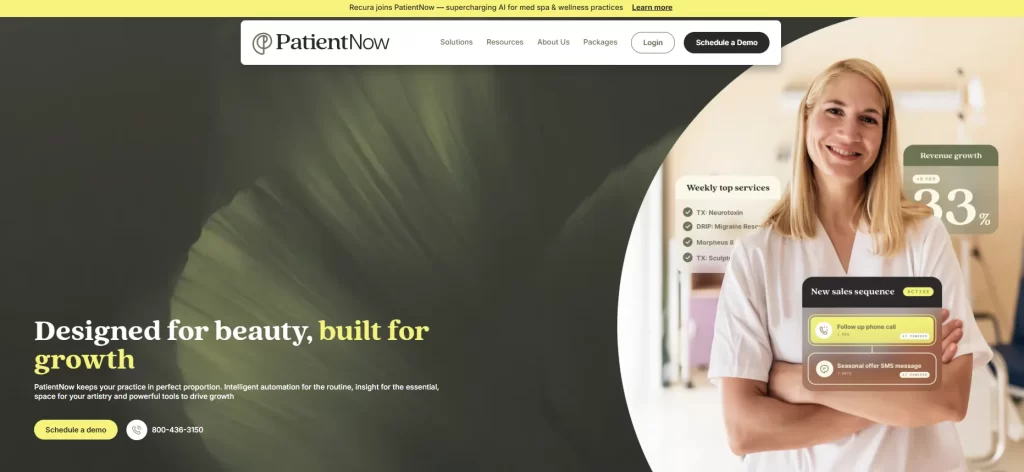
PatientNow homepage with the headline Designed for beauty, built for growth, beside dashboard cards for revenue growth and SMS sales sequences
PatientNow leads with revenue and sales-sequence tools, a sign of how heavily it leans on converting cosmetic consultations into booked procedures.

After surgery, the patient portal handles digital intake forms, consent and post-operative instructions. So the same record follows the patient from inquiry to recovery.

Key features built for cash-pay surgery

  • RxPhoto integration: Capture standardized before-and-after images with consistent lighting, angles and positioning inside the patient record.
  • Cosmetic surgery EMR: Procedure-specific templates for surgical notes, graft documentation and multi-stage treatment plans.
  • Patient financing: CareCredit and Cherry integration for cash-pay procedures, with automated payment plan management.
  • Lead management CRM: Track consultation-to-surgery conversion, marketing ROI and acquisition channels across campaigns.
  • Digital consent management: Electronic consent forms with procedure-specific disclosures, risk documentation and signature capture.
  • Inventory and supply tracking: Monitor surgical instruments, consumables and post-operative medications with usage-based alerts.

Where PatientNow earns its place

  • Cosmetic surgery focus: PatientNow is built for cash-pay surgical practices, so there are no insurance-first workflows to bend into shape.
  • Photo documentation: RxPhoto provides medical-grade before-and-after photography with standardized protocols for planning and outcome tracking.
  • Patient financing: Direct CareCredit and Cherry connections reduce friction when a consultation turns into a booked procedure.

Where PatientNow needs extra setup

  • Hair-specific fields: Graft counts and donor-area notes are covered, but donor density mapping and follicular unit tracking need custom configuration.
  • Multi-location support: PatientNow mainly serves single-location practices, and multi-site coordination needs additional setup and possibly higher cost.
  • Learning curve: The depth across EMR, CRM and photo management calls for thorough staff training during implementation.

What 297+ Capterra reviewers say about PatientNow

PatientNow holds a 3.9 out of 5 rating on Capterra from 297+ reviews. Users praise the RxPhoto integration and cosmetic surgery focus, though some say setup needs dedicated implementation time. G2 reviewers highlight the CRM and patient financing tools.

Pricing: Quoted per practice

Custom
Quoted per practice · RxPhoto, EMR, CRM, financing
Contact sales

PatientNow doesn’t publish prices on its website, so every practice gets a quote based on size and feature needs.

AestheticsPro: Best for photo-led practices willing to build graft fields

Rating4.4/5★★★★★
The bottom line

AestheticsPro gives aesthetic practices strong photo timelines and e-prescribing, but surgical blocks and graft fields need workarounds.

Who it’s for
  • Aesthetic practices adding hair restoration
  • Practices built around before-and-after imagery
  • Teams that e-prescribe post-op medications
PricingFrom $160/monthPro-Plus, two users
What works
  • Timeline photo management with comparison views
  • Integrated e-prescribing
  • Published tier pricing
What doesn’t
  • No surgical block scheduling for long FUE sessions
  • Graft and donor fields need custom configuration

AestheticsPro is aesthetic-specific practice management software with a strong emphasis on photo documentation and electronic medical records. It serves plastic surgery and dermatology practices where before-and-after imagery anchors consultations and treatment planning.
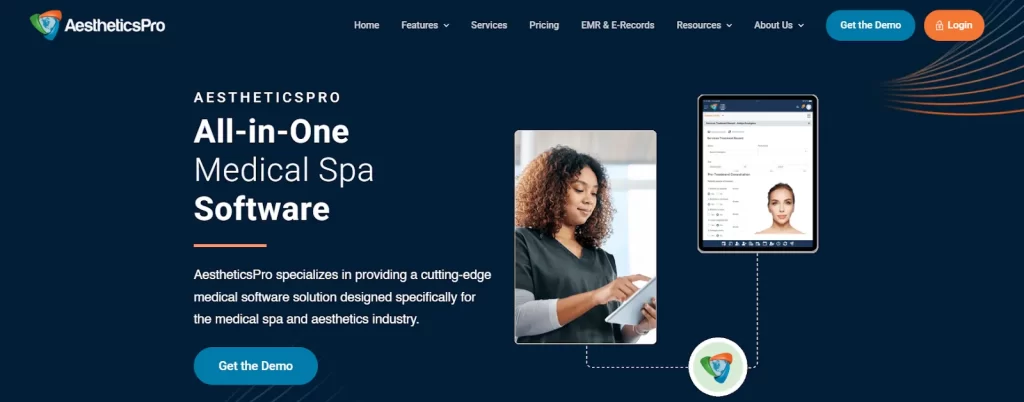
AestheticsPro homepage describing all-in-one medical spa software, with a tablet showing a patient chart
AestheticsPro markets itself as medical spa software first, which explains why its templates start from facial aesthetics rather than scalp surgery.

Three questions to put to AestheticsPro in the demo

Can it hold a six-hour FUE session? Not cleanly. The calendar lacks the surgical block scheduling and resource allocation long sessions need.

Will graft fields be there on day one? No. Clinical templates handle procedure notes, but graft counts and donor assessment need custom configuration.

Where does it earn its fee? Photo timelines track healing across follow-ups spanning 12 to 18 months. E-prescribing also connects to pharmacy networks for post-operative medications.

Key features that lean on photos

  • Photo management: Capture, organize and compare patient images with timeline views and angle-standardized photography protocols.
  • Electronic prescribing: Send prescriptions straight to patient-selected pharmacies through integrated e-prescribe networks.
  • Patient relationship management: Track patient communications, treatment histories and referral sources in built-in CRM tools.
  • Customizable EMR templates: Build procedure-specific clinical notes and consent forms for aesthetic workflows.

Where AestheticsPro shines for photo-led practices

  • Photo documentation: Timeline-based image organization supports the visual record at the heart of hair transplant consultations and surgical planning.
  • E-prescribing: Direct pharmacy connectivity streamlines post-operative prescriptions for pain control, antibiotics and hair growth medications.

Where AestheticsPro falls short on surgery

  • Limited hair transplant specificity: Facial-aesthetics templates need significant customization for graft tracking, donor mapping and FUE or FUT differences.
  • Scheduling constraints: The calendar lacks the surgical block scheduling and resource allocation that four-to-six-hour FUE sessions need.
  • Inventory depth: Surgical supply tracking is lighter than in platforms built for operating rooms with sterilization cycles and expiration monitoring.

What 650+ Capterra reviewers say about AestheticsPro

AestheticsPro holds a 4.4 out of 5 rating on Capterra from 650+ reviews. Users highlight the photo documentation tools and aesthetic-specific EMR templates. Some reviewers say scheduling could be stronger for practices managing complex surgical blocks.

Pricing: From $160 a month on published tiers

PlanPriceUsersKey inclusions
Pro-Plus
$160/month2 (up to 3, at $85/month per extra user)Mobile app, client portal with online booking, EMR form library
Executive
$285/monthUnlimitedAdds multi-location support, advanced integrations, live support
Enterprise
$350/monthUnlimitedAdds custom API solutions, dedicated live support, custom reporting

AestheticsPro publishes these tiers on its own site, offers savings for annual prepay and notes that some features carry an additional fee.

Nextech: Best for large plastic surgery groups that also bill insurance

Rating4.1/5★★★★★
The bottom line

Nextech suits large plastic surgery groups that run hair restoration as one service line among many.

Who it’s for
  • Multi-provider plastic surgery and dermatology groups
  • Practices billing insurance for reconstruction cases
  • Groups with dedicated billing teams
PricingCustom quoteno published pricing
What works
  • Revenue cycle management and claims workflows
  • Integrated CRM and procedure analytics
  • Multi-location databases and reporting
What doesn’t
  • Configuration overhead for small practices
  • No hair-specific fields without custom setup

Nextech delivers enterprise-grade practice management software for multi-provider plastic surgery and dermatology groups. Its cloud EMR runs hair transplants, facial aesthetics, body contouring and reconstruction in one clinical and financial system.

Nextech homepage with the headline Thrive On and a message about specialty-specific software for patient care
Nextech positions itself as specialty-specific software, and its hair restoration support comes through its wider plastic surgery EMR.

The integrated CRM tracks acquisition channels, referral sources and campaign results across service lines. Hair restoration teams inside larger groups use these analytics to measure procedure profitability and patient lifetime value.

Is your practice big enough for Nextech?

Nextech repays its setup effort only at a certain size. Before you book a demo, check how many of these describe you:

  • You run several surgeons or more than one location.
  • You bill insurance for some reconstruction cases.
  • You have a billing team to own claims and denials.
  • You can give implementation time to building hair-specific fields.

If you ticked one or none, the enterprise configuration will likely cost more effort than it saves.

Key features aimed at large groups

  • Cloud-based EMR: Open patient records, clinical documentation and the schedule from any connected device, with role-based security.
  • Integrated CRM: Track acquisition costs, referral sources and marketing ROI across service lines and locations.
  • Analytics: Report on procedure volumes, practitioner productivity and revenue with customizable dashboards.
  • Revenue cycle management: Automated claim submission, denial management and accounts receivable tracking for surgical and non-surgical services.

Where Nextech’s scale pays off

  • Enterprise scale: Cloud architecture supports multi-location groups with central patient databases, coordinated scheduling and group-wide financial reporting.
  • Revenue cycle depth: Claim workflows, denial tracking and receivables management suit practices mixing cash-pay cosmetic and insurance reconstruction cases.
  • Business intelligence: Custom dashboards measure procedure profitability, practitioner productivity and acquisition costs with drill-down reporting.

Where Nextech outsizes a small practice

  • Complexity overhead: Small single-provider practices may find the enterprise configuration more than they need.
  • Cost structure: Enterprise positioning puts Nextech out of reach for many solo practitioners and small practices.
  • Generic surgical templates: Charting covers many plastic surgery procedures but has no hair transplant fields without custom configuration.

What 239+ Capterra reviewers say about Nextech

Nextech holds a 4.1 out of 5 rating on Capterra from 239+ reviews. Users praise the enterprise scalability and revenue cycle tools. Some reviewers say smaller practices struggle with the platform’s breadth without dedicated IT support.

Pricing: Enterprise quotes only

Custom
Quoted per practice · Cloud EMR, CRM, analytics, revenue cycle management
Contact sales

Nextech doesn’t publish prices on its website, so practices request an enterprise quote from its sales team.

DrChrono: Best for surgeons who want to chart chairside on an iPad

Rating4.0/5★★★★★
The bottom line

DrChrono brings iPad-first charting and dual insurance and cash-pay billing to surgical practices comfortable wiring in third-party tools.

Who it’s for
  • Surgeons who chart chairside on an iPad
  • Practices mixing insurance reconstruction and cosmetic cases
  • Teams with the skills to use an open API
PricingCustom quoteFoundation, Growth and Premium tiers
What works
  • Native iPad app for point-of-care notes
  • Flexible form builder
  • Insurance and cash-pay billing in one engine
What doesn’t
  • Captures photos on the iPad, but no standardized before-and-after timeline or side-by-side comparison view
  • Graft calculators and donor mapping need custom forms

DrChrono provides a cloud-based EHR, practice management and medical billing platform with an iPad-first design. It serves practices across specialties and is strongest at mobile documentation at the point of care.
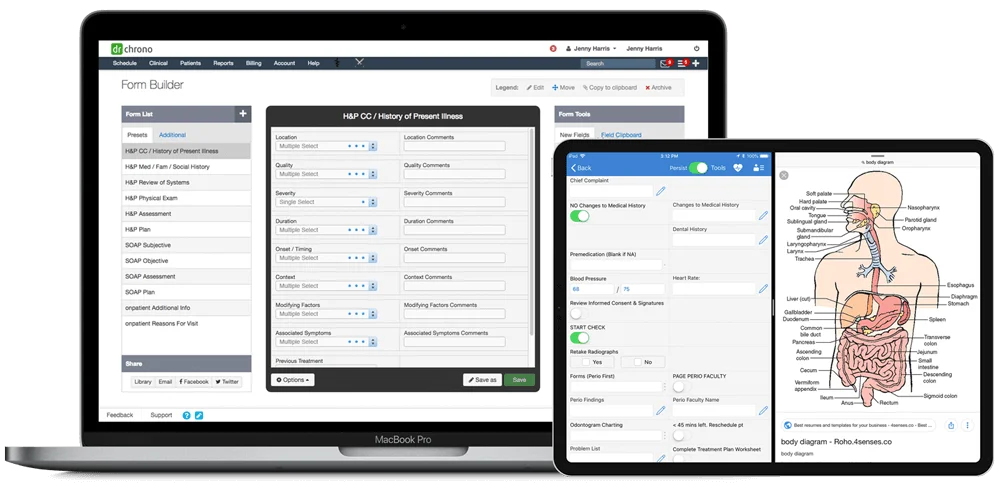
DrChrono form builder on a laptop beside the DrChrono iPad app showing a clinical intake chart
DrChrono’s form builder and iPad app let a surgeon build a graft-count form once, then complete it chairside during the procedure.

Two mistakes practices make when buying DrChrono

The first mistake is assuming the iPad app delivers standardized before-and-after photography. Surgeons can capture photos on the iPad, but there’s no built-in timeline or side-by-side comparison view, so budget for a third-party photo tool connected through the open API for that.

The second is underestimating the billing module. It handles insurance claims and cash-pay processing, which suits practices mixing cosmetic and reconstruction cases. Without dedicated billing staff, though, small teams can find it overwhelming.

Get past those two, and the OnPatient portal covers digital intake, appointment scheduling and secure messaging.

Key features for chairside charting

  • iPad-native documentation: Chart surgical notes, capture photos and complete forms on an iPad during procedures, with offline sync.
  • Customizable medical forms: Build templates for graft counts, donor area assessments and surgical technique without developer help.
  • Integrated e-prescribing: Send prescriptions electronically for post-operative pain management, antibiotics and hair growth medications.
  • Medical billing engine: Process insurance claims for reconstructive cases and cash-pay transactions for cosmetic procedures in one system.
  • Open API: Connect third-party apps for specialized photo management, patient communication and analytics.
  • OnPatient portal: Patients complete intake forms, request appointments and refills, and message providers securely.

Where DrChrono’s iPad focus helps

  • iPad-first mobility: Surgeons document at the point of care instead of returning to a desktop between patients.
  • Flexible form builder: Customizable templates adapt to hair transplant documentation without rigid pre-built structures.
  • Dual billing: One billing engine handles insurance claims for reconstructive hair restoration and cash-pay cosmetic procedures.

Where DrChrono leaves work to the API

  • No standardized before-and-after photo management: The iPad app captures photos, but practices needing timeline tracking or side-by-side comparison views must connect a third-party tool through the API.
  • General-purpose architecture: Graft calculators and donor mapping need custom form configuration because DrChrono serves every specialty.
  • Billing learning curve: The billing module can overwhelm small practices without dedicated billing staff or prior EHR experience.

How DrChrono scores on Capterra and G2

DrChrono holds about a 4.0 out of 5 rating on Capterra from 490+ reviews, with users highlighting the iPad experience and customizable forms. G2 reviewers rate it 4.3 out of 5 and praise its interface and API flexibility. Some users say support response times vary on complex billing questions.

Pricing: Three tiers, no published prices

PlanPriceUsersKey inclusions
Foundation
Contact sales / no published pricingQuoted per providerEHR, patient engagement, practice management, billing
Growth
Contact sales / no published pricingQuoted per providerAdds automated revenue cycle workflows
Premium
Contact sales / no published pricingQuoted per providerAdds AI tools and premium add-ons

DrChrono lists its three tiers on its website but no longer publishes prices, so each practice requests a quote.

Which software handles hair restoration and medical aesthetics together?

Software handles both hair restoration and medical aesthetics when one patient record runs surgical workflows and fast cosmetic bookings side by side.

The surgical half covers grafts, donor mapping, consent and long procedure blocks. The cosmetic half covers memberships, retail, packages and 30-minute injectable slots. Hair-transplant-only software rarely covers the second half, and generic spa software rarely covers the first.

We call the check the Multi-Specialty Fit Test. Run it before your first demo, because the answers decide which two or three vendors belong on your shortlist.

  1. Your service mix today. Count last month’s appointments that weren’t hair restoration. If injectables, lasers or skin visits show up every week, you need both halves in one record.
  2. Whether donor and recipient fields justify single-purpose software. None of the five platforms here ships the full set of graft, donor-density and recipient-zone fields ready-made. Every option needs some configuring, so specialization alone doesn’t earn a narrower system.
  3. Your growth plans. If the next two years add injectables, skin treatments or other aesthetic services, choose the system that already covers both halves. Migrating patient records mid-growth costs more than configuring forms once.

Applied to this list, the Multi-Specialty Fit Test sorts the five picks into three shortlists:
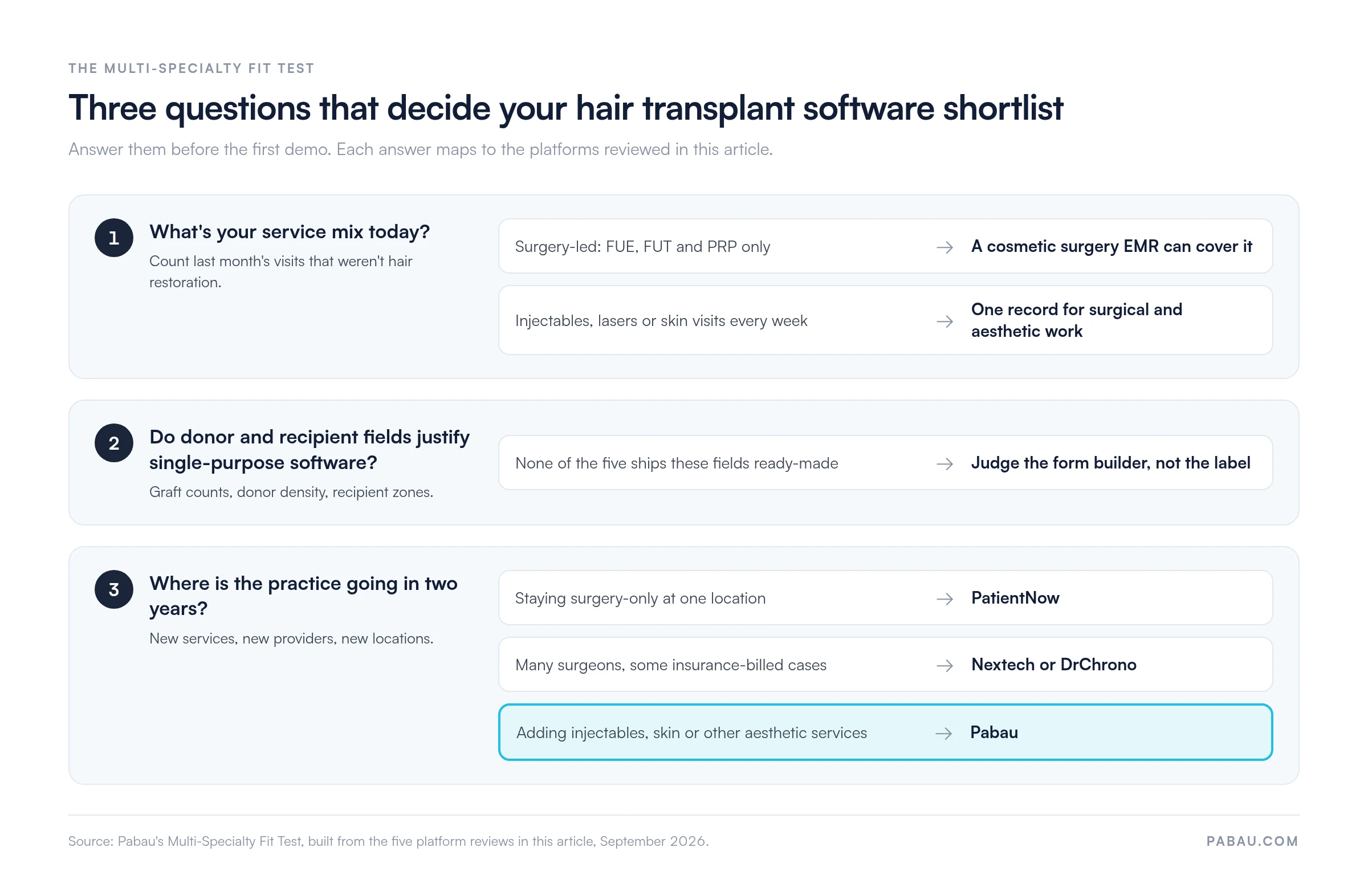
Decision diagram of the Multi-Specialty Fit Test. Question 1, service mix: surgery-led practices can use a cosmetic surgery EMR, practices with weekly injectable, laser or skin visits need one record for surgical and aesthetic work. Question 2: none of the five platforms ships graft and donor fields ready-made, so judge the form builder. Question 3, two-year plan: surgery-only at one location points to PatientNow, many surgeons with insurance-billed cases points to Nextech or DrChrono, adding aesthetic services points to Pabau.
The Multi-Specialty Fit Test narrows five platforms to one or two per practice type, starting from what the practice sells today. Source: Pabau’s analysis of the five reviews in this article.

Surgery-led practices that plan to stay that way do well with PatientNow at one location. Nextech and DrChrono fit where insurance cases and several surgeons are involved.

Practices already selling injectables or skin treatments pass the Multi-Specialty Fit Test with Pabau. If your menu leans further into aesthetics, dedicated software for med spas covers the cosmetic side in more depth.

How to choose hair transplant clinic software in six demo tests

Choose hair transplant clinic software by testing six workflows in a live demo: intake, surgical charting, CRM follow-up, surgical-block scheduling, photo timelines and cash-pay billing.

Each check below ends with a demo test. Ask the vendor to perform it on screen, because a feature list can’t show you how many clicks a surgery day takes.

Patient intake software for hair clinics should screen before the consult

Patient intake software for hair clinics screens candidacy before the consultation, so surgeon time goes to patients who can go ahead with surgery. A good form asks about hair-loss pattern and duration, prior procedures, current medications and conditions that affect healing.

The same intake should capture consent to photography and the patient’s donor-area concerns before the first visit. Pabau’s patient intake software sends these forms ahead of the appointment and files each answer on the patient record.

Demo test: Ask the vendor to send a test intake form to your phone, complete it, and show where each answer lands in the chart.

Surgical notes need graft counts, not free text

Hair transplant procedures need surgical notes that generic EMR templates can’t hold. Check whether the platform captures graft counts per follicular unit, donor density, FUE or FUT technique and recipient zone coverage. Without those fields, practitioners keep a separate surgical log and lose the time the software was meant to save.

Demo test: Ask to see a finished FUE note with graft counts by zone, not a blank template.

CRM software for hair clinics should count surgeries, not just leads

CRM software for hair clinics tracks each lead from first inquiry to booked surgery. It then keeps the patient on a recall schedule through the 12-to-18-month growth timeline. Recall matters, because the month-six and month-12 photo visits are where results get documented and referrals start.

The stronger systems also record the referral source on every lead, so you see which channel produces surgeries rather than consultations. PatientNow and Nextech build this into their CRM tools. Pabau connects to HubSpot, Salesforce and GoHighLevel if you already run one. Our guide to hair clinic CRM software shows the recall side in detail.

Demo test: Ask for a report of consultations booked versus surgeries completed, by lead source, for last quarter.

A six-hour FUE block will break a spa calendar

FUE procedures take four-to-six-hour blocks with equipment preparation, surgical assistant coordination and room turnover. Software built for 30-to-60-minute spa appointments can’t hold that. Check for custom durations, resource allocation for assistants and instruments, and buffer time for pre-op preparation.

Multi-provider and multi-location practices also need a combined view across rooms and sites. A central patient database keeps one location’s surgery day from colliding with another’s. See how medical scheduling software handles surgical blocks.

Demo test: Ask the vendor to book a six-hour FUE block with two assistants and one room, then try to double-book that room.

Month-12 photos only work if day-one photos match

Before-and-after photography anchors consultations, surgical planning and outcome reviews. Look for angle-standardized capture, timelines that span the 12-to-18-month follow-up, and side-by-side comparison views. Photos should land on the patient record directly, not on a practitioner’s phone.

Unstructured uploads produce inconsistent angles and lighting, which makes month-12 comparisons hard to trust. A dedicated photo module keeps consent, photos and the treatment note in the same record.

Demo test: Ask to see one patient’s crown photo at consultation, day one and month 12 in a single view.

Cash-pay billing has to start at the consultation

Most hair transplant procedures are cosmetic, so patients pay out of pocket rather than through insurance. The software needs deposit collection at consultation, multi-installment payment plans and quotes for high-value procedures. Insurance-first platforms built around claim submission add little for a mostly cash-pay practice.

Compare payment processing fees, deposit automation and reports that track outstanding balances across patients. Financing partners such as CareCredit and Cherry, built into PatientNow, help patients commit to surgery at the consultation.

Demo test: Ask the vendor to take a consultation deposit, set up a three-installment plan and show the outstanding balance report.

How Pabau carries a hair transplant patient from consultation to final photo

Many hair restoration practices still run intake on PDFs, keep follow-up photos on a phone and take deposits through a standalone terminal. Each handoff between those tools is a chance to lose a consent form or a month-12 photo.

Pabau replaces that patchwork with one record per patient. Intake forms, consent, the surgical note, deposits, payment plans and follow-up photos sit on the same timeline. Pabau GO, our iOS app for practitioners, guides patients through forms, consents and before-photo prompts ahead of the visit.

The result is a surgery day that starts with a complete chart, and a 12-month review that takes one screen instead of three systems. Every Pabau subscription includes every feature, so your aesthetic services run in the same system as your surgical ones.

Streamline your hair restoration practice

See how Pabau’s all-in-one platform handles FUE and FUT documentation, graft tracking and cash-pay billing for hair transplant practices.

Pabau clinic management software demo

Conclusion

Start your decision with the treatment menu, not the feature lists. A surgery-only practice at one location does well on PatientNow. A multi-surgeon group that bills insurance belongs on Nextech or DrChrono.

Once injectables and skin treatments join the menu, surgical and aesthetic work need to share one record. That’s where a single system saves the most double entry.

Whichever two platforms make your shortlist, run the six demo tests with your own surgery-day scenario before you sign. Graft fields take some configuring on every option here, so the form builder and the onboarding support decide how fast you go live.

To see a graft-count note, a surgery block and a payment plan set up in Pabau, book a demo with our team.

Continue your research

Continue your research

Want lead tracking built for hair restoration? Hair clinic CRM software shows how consultations, recalls and referrals run for follicular restoration practices.

Getting ready to open your doors? How to start a hair transplant clinic walks through licensing, staffing and equipment in order.

Worried about audits and consent records? Compliance for hair transplant clinics covers the documentation regulators expect to see.

Need a consent form your surgeons can use today? Hair transplant consent form gives you a ready template covering risks, alternatives and aftercare.

Frequently asked questions

Is hair transplant clinic software HIPAA compliant?

It can be, but compliance depends on the vendor’s setup and your contract. Before you sign, ask for a signed business associate agreement (BAA), which HIPAA requires from any vendor that stores patient data. Also confirm role-based access and an audit trail on clinical notes and photos.

Can I move before-and-after photos to new hair transplant software?

Usually, but check before you sign. Some migrations move demographics and appointments but leave photos behind or strip their capture dates. Month-12 comparisons depend on those dates, so write the photo scope into the migration plan.

Do I need separate 3D planning software for hair transplants?

Only if your surgeons want 3D scalp simulation, which practice management software doesn’t run. Those practices use a dedicated planning tool alongside. File each plan or simulation image on the patient record, next to the consent and surgical note.

How long does it take to switch hair transplant clinic software?

Plan for two to eight weeks, depending on data volume and how many forms need building. All-in-one systems like Pabau take four to six weeks for form setup, training and migration. Run both systems side by side for about a month.

Can salon software work for a hair transplant practice?

No. Salon and spa platforms lack the medical charting, consent management and HIPAA-compliant records that surgery requires. They’re also built for 30-to-90-minute beauty services, not multi-hour surgical blocks with post-operative follow-up.


Found our content helpful?
×