Facial skin treatment consent form template: Microneedling and phi-ion
A facial skin treatment consent form is the signed proof that a patient was scre...

3
Last Updated: Oct 21, 2026
An Exilis patient treatment record is the session log for BTL’s radiofrequency device, which practices use for skin tightening and body contouring. Results build over a course of visits. So when session four disappoints, the record is the only way to see what changed since session one.
Our free one-page form logs the area treated, grounding pad location, power in watts, duty factor, cooling and treatment time. It also captures photos, notes and the therapist’s signature. Screening, consent and aftercare stay in their own records, and the notes box points to them.
Below, you’ll see how to fill each field, where records go wrong, and what to check before signing.
A one-page form covering area treated, first-treatment date, grounding pad location, duty factor, power (W), cooling, minutes per area and total time. It also records whether photos were taken and the background used, plus treatment notes, patient feedback and the therapist’s signature.
Download template
The form logs each session’s area, grounding pad location, power, duty factor, cooling, minutes per area and total time.
Consistent entries let any practitioner repeat or deliberately adjust the settings across a multi-session course.
The template has no screening, consent or aftercare fields, so keep those in your intake and consent records.
Photos taken against the same background make session-to-session comparisons fair.
A signed, dated entry for every visit is your answer when a patient questions a result or reports a reaction.
The template records the session itself: parameters, areas, timing, photos and notes. It doesn’t screen the patient, capture consent or list aftercare. You can add those fields to the template, or keep them in your consent and aftercare records and reference them in the notes.
The panel below splits the two, so you can see which documents travel with each session.
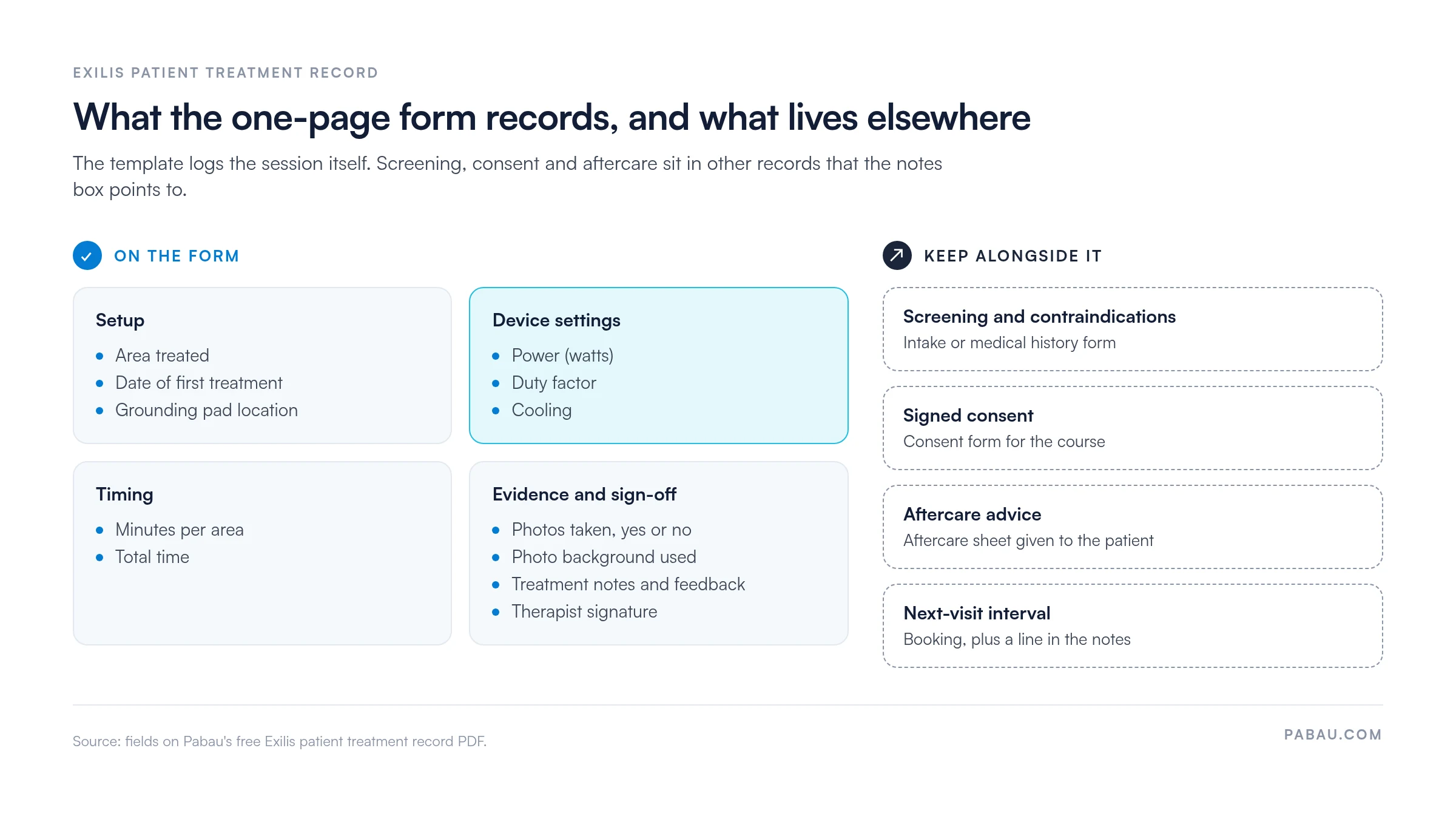
Here is what to write in each field, in the order you’ll meet them.
The record works best when you complete it at the same point in every appointment, ideally while the patient is still in the room. Follow this order:
Decide where screening, consent and aftercare will live before the first session. Then write that reference in the notes box every time, so each entry points to the same documents.
Picture a patient booked for a course on the abdomen. At session one, the practitioner logs the area, the start date, the pad position and the settings. They also take photos against a plain backdrop and note the background used.
By session three, a colleague is covering the list. Instead of guessing, they read the last entry and start from the same power and duty factor. If the patient reported too much heat last time, the notes say so, and the colleague can adjust on purpose.
At the final review, the photo entries make the comparison fair. Same background, same area, dated visits. That is the evidence you’ll want if the patient later questions the result.
Most problems come from small habits rather than missing paperwork. Watch for these:
Take 30 seconds at the end of each appointment and confirm the entry is complete.
Any practice offering non-invasive skin tightening or body contouring with Exilis can use the form. It suits:
Many of these practices keep one record per device, such as a Hydrafacial treatment record alongside this one. Others store every device log inside their medical spa software, so records follow the patient rather than the room.
A complete record answers questions before they become complaints. When a patient reports redness or questions their results, you can show the exact settings, timing and notes from each visit.
It also helps with inspections. In England, CQC Regulation 17 expects accurate, complete and contemporaneous records for each patient. In the US, state boards set their own record-keeping rules, so check yours.
The same habit helps with aftercare. Our Thermage aftercare template shows how an RF tightening aftercare sheet can look, and your notes simply record that it was handed over.
A paper or PDF record works, but it gets harder once several practitioners share a patient list. Pabau, the practice management platform we build, lets you send digital intake forms and consent before the first session. The answers are on file before the practitioner begins.
Each treatment entry then sits in the patient’s medical records, next to their consent, photos and aftercare notes. Before starting, the practitioner sees the previous session’s settings and feedback, without searching through a folder.

Pabau links treatment notes, consent and aftercare to each patient, so your team can find the last session in seconds.

The settings fields are the part worth protecting. Fill them in during the session, every session, and any practitioner can pick up the course where the last one stopped.
The trade-off is a minute of admin per visit. In return, you get a clear answer when a patient asks what was done. Download the form, decide where screening and aftercare live, and start with your next Exilis patient.
If you’d rather keep each session’s settings, photos and consent in one patient file, book a demo to see how Pabau handles Exilis records.

Logging another treatment course? Chemical peel treatment record uses the same session-by-session layout for peels.
Running body contouring alongside Exilis? CoolSculpting treatment form covers the session details for cryolipolysis.
Need consent for a contouring course? CoolSculpting consent form shows the risks and history questions to capture first.
Offering RF microneedling too? Morpheus8 aftercare gives patients clear post-treatment instructions.
Writing aftercare for RF-assisted lipo? AccuTite aftercare instructions covers recovery, wound care and warning signs.
Exilis delivers monopolar radiofrequency, so a grounding pad on the patient’s skin completes the circuit. The pad usually sits on the back. Metal implants shouldn’t lie in the path between the treatment area and the pad. Recording the pad location lets the next practitioner repeat a safe setup.
Yes. Exilis Ultra is BTL’s later version, which adds ultrasound to the radiofrequency. Use the same form, but write the device name in the treatment notes. That way, a course that switches devices still compares like with like.
Providers commonly plan four to six sessions, spaced one to several weeks apart. The exact plan depends on the area and BTL’s protocol for it. Complete one entry per session, and keep the first-treatment date so the course length is clear.
It depends on where you practice. In the US, each state sets its own retention period for medical records. In England, NHS guidance sets eight years for adult records, and many private practices follow it. Check your regulator’s rules before you archive or destroy a record.