Anja Dodevska
Good character traits list
What is a good character traits list? A good character traits list is a structur...

3
Last Updated: Oct 30, 2026
Free PDF 2 pages, print-ready Clinician-reviewed
A dental vacuum form is a production record for each vacuum-formed appliance your practice makes. It captures the patient, the appliance type, the sheet material and thickness, the heating settings, and the final fit check.
Retainers, sports mouthguards, bleaching trays, and occlusal splints all come off the same machine, but each needs different settings. One standard form gives your team a repeatable process and a traceable record for every appliance it produces.
A one-page production record covering patient and appliance details, model preparation, sheet material and thickness, heating settings, and the final fit check. Use it for retainers, mouthguards, bleaching trays, and occlusal splints.
Start from scratch, or upload this PDF or any form you already use, and Pabau's AI Form rebuilds it with tick boxes, text fields and a signature. Attach it to the treatment once, and every patient gets it on time.
AI Form rebuilds the consent, history and aftercare forms you already use. You review each one, then publish.
Patients complete forms on their phone before they arrive, so the front desk stops retyping paper.
Every signed form is versioned and attached to the treatment record, ready when you need it.
Set how long a consent stays valid. Returning patients skip forms they have already signed.
Supports HIPAA and GDPR compliance AES-256 encryption 4.8 on G2 4.7 on Capterra Trusted by 4,000+ practices worldwide

A dental vacuum form records the patient, appliance type, sheet material and thickness, heating settings, and fit check for each appliance your practice makes.
Retainers and bleaching trays use thin 0.75–1.0 mm sheet, while sports guards and occlusal splints need 1.5–2.0 mm to take bite force.
Logging temperature and hold time on each form lets you trace a failed appliance back to the step that caused it.
Completed forms build a library of proven settings, so new team members repeat what works instead of guessing.
Pabau, the practice management platform we build, stores the completed form in the patient record next to the treatment plan.
The form follows one appliance through the whole production cycle, from the clinician’s request to the fit check. It works as a checklist for whoever runs the vacuum former and as an audit trail for quality assurance.
A vacuum former heats a thermoplastic sheet, typically 0.75–2.0 mm thick, and uses suction to mold it over a dental model. The form records which sheet you used, at what temperature, for how long, and how the appliance turned out.
That record pays off when you reorder materials, troubleshoot a failed appliance, or show an inspector that your lab process is documented. In the UK, that inspector may come from the Care Quality Commission (CQC) in England or Healthcare Improvement Scotland (HIS).
Without a form, the settings live in one technician’s memory. With one, any team member can repeat a proven appliance or work out why one failed.
The form follows the appliance from request to delivery in five steps, and your team completes the same steps for each appliance.
Each step takes under a minute to document. After a few months, the entries show which combinations of material, thickness, and temperature work best for each appliance type.
Five appliances make up most in-house vacuum forming in a dental practice.
Each appliance has its own ideal thickness and heat settings, which is exactly what the form should capture.
Using the wrong sheet thickness is the most common vacuum forming error. A retainer that is too thin can warp, and a sheet that is too thick wastes material and feels bulky to the patient.
The appliances fall into two clear thickness bands, as the chart below shows.
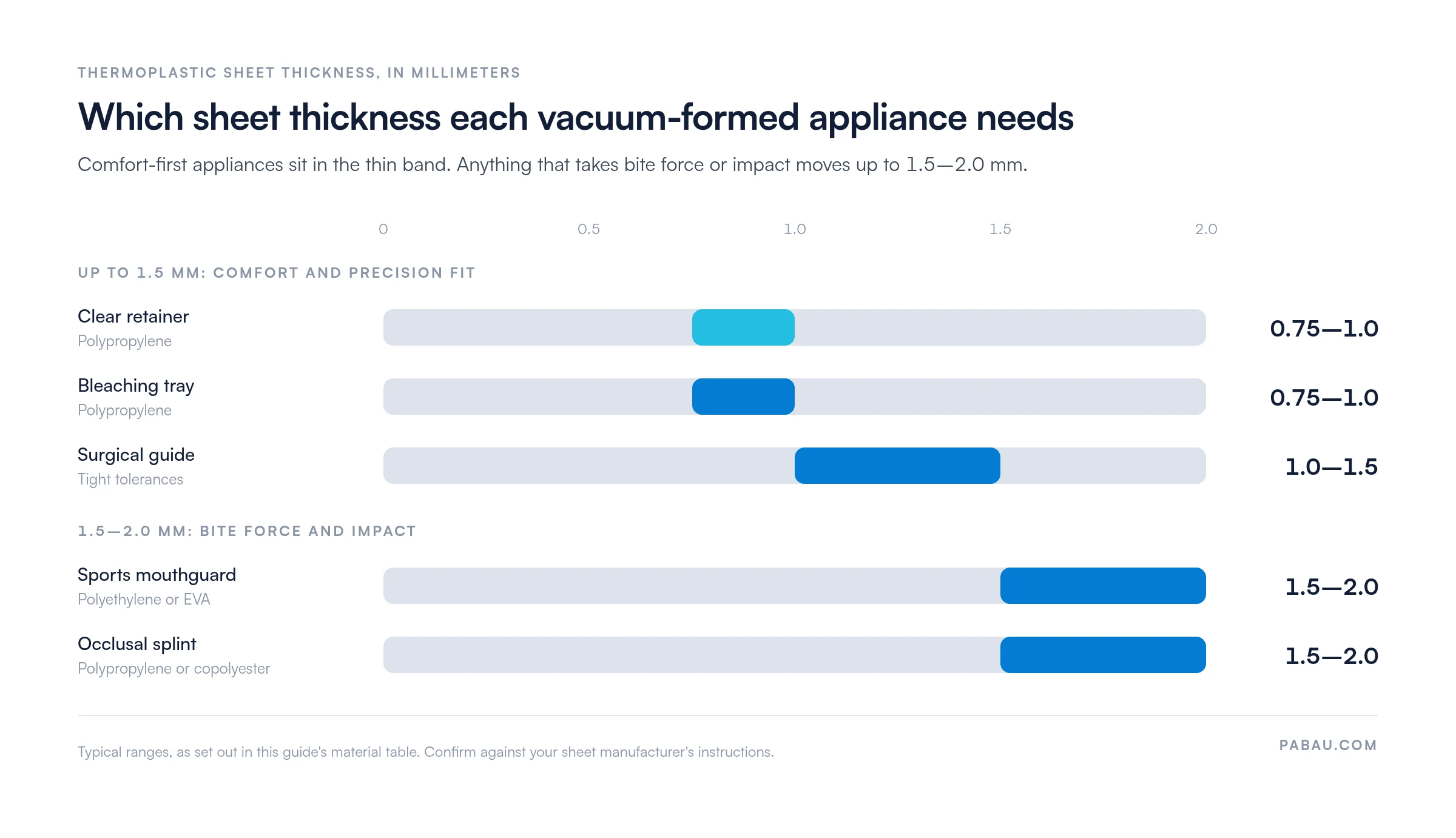
The table maps each appliance to a recommended material and heat setting.
Record the settings you actually used on every form. If an appliance fails, the documented temperature and timing show whether the sheet ran too hot or the hold was too short. Over a few months, you’ll build appliance-specific recipes your team can follow without trial and error.
In-house vacuum forming touches five points in your workflow, from the consultation to reordering stock.
The workflow only holds together if the form is completed at every step. Skip it, and appliance status turns into guesswork, quality drifts, and an audit turns up missing records.
Three types of practice get the most from a dental vacuum form.
If you outsource every appliance to an external lab, the form matters less, because the lab keeps its own production records. Once you own a vacuum former, the form becomes essential. It documents your lab process, keeps the whole team on the same steps, and protects your practice and your patients.
For cosmetic practices offering whitening, an in-house former plus a standard form means custom trays are ready in 24–48 hours instead of a week. Patients start treatment sooner, and the tray fee stays in your practice.
A standard production record pays off in five ways.
Consistency: Every team member follows the same steps, with the same sheet thicknesses and heating times. Fewer appliances fail, production moves faster, and patients get a good fit the first time.
Compliance and audit readiness: When an inspector asks how you keep lab processes safe and repeatable, your completed forms are the answer. They show documentation, infection control, and traceability for each appliance. Keeping them with your other audit evidence in compliance management software saves a hunt through folders on inspection day.
Quality assurance: The fit check catches bubbles, wrinkles, and weak seating before the appliance reaches the patient. If an appliance fails later, the form shows what happened, so you can fix the cause.
Cost control: Your forms show which materials and settings work best. You stop ordering sheet types nobody uses, and monthly usage figures give you leverage when you negotiate bulk prices.
Patient confidence: You can tell a patient their retainer was formed at a recorded temperature and fit-checked by two team members. That transparency builds trust and cuts down on complaints.
Many practices still keep the vacuum form on a paper clipboard, filed away from the patient’s notes. When a patient asks for a replacement retainer, someone has to dig out the old sheet to find the thickness and settings.
In Pabau, you can set up the vacuum form as one of your digital forms for dentists and complete it inside the patient’s file. The technician fills it in on a tablet or desktop during production and can attach a photo of the finished appliance.
Because the form lives in the patient record, the appliance history sits next to the treatment plan. It is there at recall, at a replacement request, or during an inspection. Pabau’s medical records management keeps that history in one place, so a remake starts from the settings that worked last time.

Pabau saves each completed vacuum form to the patient record. Appliance settings and fit checks are then ready at recall, at a remake, or during an inspection.

If you form appliances in-house, start documenting them now rather than after the first failed retainer. The form adds about a minute per step. In return, the settings in one technician’s head become a process anyone on the team can repeat.
Print the template, run it for a week on each appliance you make, and review the entries together. You’ll quickly see which thicknesses your team defaults to and where the fit check catches problems.
The trade-off is a little extra admin at the bench in exchange for fewer remakes and records that stand up to an inspection. Book a demo to see how Pabau keeps your vacuum forms and appliance history inside each patient’s chart.

Getting consent before you fit a splint or retainer? Dental treatment consent form covers what a patient should agree to before treatment starts.
Assessing the patient before you take impressions? Dental examination form records the oral findings that shape the appliance plan.
Onboarding a new orthodontic or whitening patient? Dental new patient form collects the history and contact details you need on day one.
Sending a patient to a specialist for implant work? Dental referral form passes the clinical details to the receiving dentist in one document.
A dental vacuum form documents how a vacuum-formed appliance was made, from the patient’s request to the final fit check. It records the material, thickness, and heating settings, creating an audit trail for quality assurance and traceability.
It depends on the appliance. Retainers and bleaching trays use 0.75–1.0 mm sheet for comfort, while sports guards and occlusal splints use 1.5–2.0 mm to resist impact and bite force. Record the thickness on each form so your team can repeat what works.
Polypropylene (PP) and polyethylene (PE) are the most common thermoplastic sheet materials. Copolyester and EVA (ethylene-vinyl acetate) are also used for specific appliances. Every sheet must be cleared for intraoral medical device use, which means CE or UKCA marking in the UK and FDA clearance in the US. Check the certification on the supplier’s documentation and note it on your form.
No. Each appliance has different functional demands. Retainers need thin 0.75 mm sheet for comfort and discretion, while guards need 1.5–2.0 mm to withstand bite force. The wrong thickness leads to failed appliances, wasted material, and unhappy patients. Recording the appliance type and thickness together keeps your team on the right combination.
Start with the completed form for that appliance. Check the heater temperature, the hold time, and when the vacuum was released. Incomplete seating usually points to a low temperature, warping to cooling too fast, and bubbles to vacuum timing. Adjust the setting the form points to, and log the change on the next form.