
 Monika Lazarevska

OT SOAP note sample: Free template and worked examples
Download your free OT SOAP note sample A four-page form with an identifying head...

1
Last Updated: Nov 5, 2026
Free PDF 2 pages, print-ready Clinician-reviewed
A customer intake form template is a ready-made document that collects a new patient's details before their first appointment. The free PDF covers contact and emergency details, the reason for the form, history, medication and allergies, and three confirmations.
It is a basic starter, so most practices add fields for their own services. Medical practices add insurance details and a systems review. Spas add skin type and sensitivities, while aesthetic practices add pregnancy status and photo consent. Completed before the visit, the form gives practitioners context and saves the front desk transcription time.
A starter intake form with contact and emergency details, the reason for the form, history, medication and allergies. It ends with confirmations and office-use fields, ready to print or adapt to your practice.
Start from scratch, or upload this PDF or any form you already use, and Pabau's AI Form rebuilds it with tick boxes, text fields and a signature. Attach it to the treatment once, and every patient gets it on time.
AI Form rebuilds the consent, history and aftercare forms you already use. You review each one, then publish.
Patients complete forms on their phone before they arrive, so the front desk stops retyping paper.
Every signed form is versioned and attached to the treatment record, ready when you need it.
Set how long a consent stays valid. Returning patients skip forms they have already signed.
Supports HIPAA and GDPR compliance AES-256 encryption 4.8 on G2 4.7 on Capterra Trusted by 4,000+ practices worldwide

A customer intake form template collects a new patient’s details, history, and medication before the first appointment.
The free PDF is a basic starter with contact, emergency, history, medication, and confirmation fields.
To edit the flat PDF, write on a printout, rebuild it in Word, or upload it to Pabau’s AI Form.
Most practices add date of birth, service goals, and a data consent tick-box, plus fields for their specialty.
HIPAA binds covered providers only, but UK and EU GDPR treat all health data as special category data.
Sending the form digitally at booking puts the answers in the patient record before the visit.
A customer intake form template is a standard document for collecting a new patient’s information before the first visit. It replaces improvised questions at the desk with one structure that every team member follows.
Salons and spas usually say “client”, while medical practices say “patient”. This guide uses customer, client and patient interchangeably.
Its scope is wider than a consent form’s. A consent form, such as our client consent form, records agreement to one specific treatment. An intake form builds the wider picture. It records who the patient is, what brought them in, and which conditions or medications matter.
Both forms sit in the same onboarding workflow, but they serve different legal and clinical purposes. Our overview of medical forms in practice shows where each one fits in the patient journey.
A well-designed intake form does more than collect data. It shapes the first visit and creates a dated record that protects the practice if a complaint or audit arises.
The free PDF is a basic starter. It covers contact and emergency details, the reason for the form, relevant history, medication and allergies, and three confirmations. Its header asks for an employee name, job title and department, so relabel those fields for patients.
It lacks fields most practices rely on, such as date of birth, service goals and a data consent tick-box. The diagram splits what you keep from what you add.
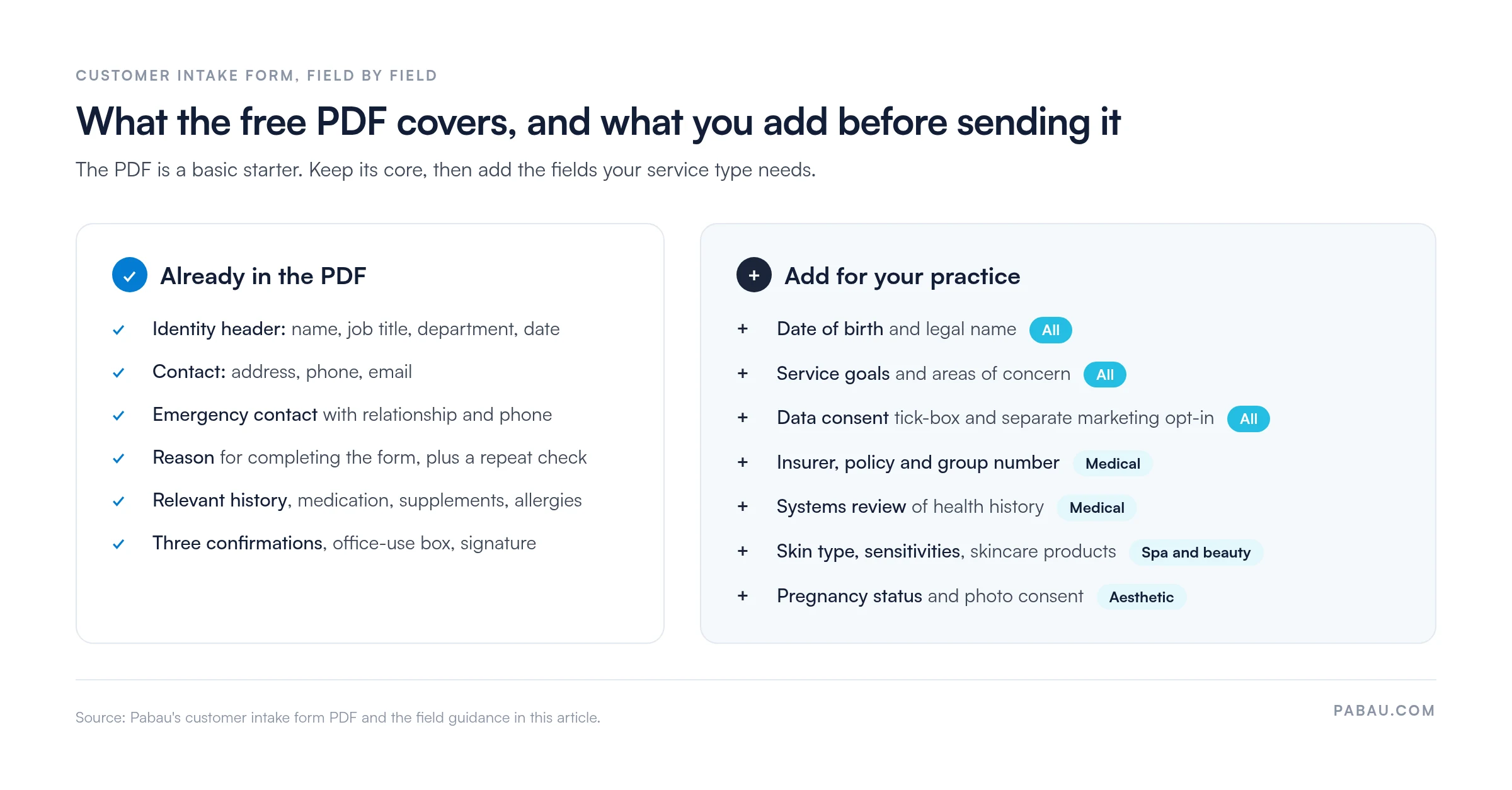
The table works as a checklist of field groups for aesthetics, medical, spa and allied-health settings. The last column shows how much of each group the PDF already covers.
Collect the full legal name, date of birth, phone number, email address and home address. These fields drive appointment reminders, billing and patient identification across visits. Add a separate preferred-name field if some patients go by a different name day to day.
In aesthetic, spa and allied-health practices, this section catches contraindications before treatment. Include current medications, both prescription and over-the-counter, plus known allergies, diagnosed conditions and recent surgeries.
Let clinicians, not form designers, decide which conditions are clinically significant for each service. In medical practices, the section expands into a full systems review.
In the United States, HIPAA applies only to covered healthcare providers and their business associates. Many cash-only spas and salons fall outside it, though state privacy laws may still apply.
For covered practices, most uses beyond treatment, payment, and health care operations need written patient authorization. Those cases go on a separate HIPAA authorization form, not the intake form.
Practices also give the Notice of Privacy Practices at first service and seek written acknowledgement of receipt. In the UK and EU, GDPR Article 9 treats health data as special category data needing an Article 9 condition. Explicit consent is one route, and care delivery can rely on another.
Whichever rules apply, your consent section should include these four elements.
The PDF has a single signature line. For patients under 18, add a line where a parent or guardian signs and notes their relationship to the patient.
Signed forms also need version control, which compliance management software can track for audits. A template is a starting point, so check your specific obligations with legal counsel before you use it.
Open questions here let practitioners personalize the appointment before the patient arrives. Ask what the patient hopes to achieve, which concerns brought them in, and whether they have had similar treatments before.
Short answer fields work better than long text boxes. Patients answer more completely when the question is specific. Our client questionnaire sets those goal questions beside medical history, medications, allergies and lifestyle in one form.
The core fields apply to every practice. What changes across specialties is the depth of some sections and the questions inside them.
Medical practices extend the history section into a full systems review, covering cardiovascular, respiratory, musculoskeletal, neurological and reproductive health. Insurance and billing fields become mandatory, so add the insurer’s name, policy number and group number alongside the billing address. The consent section should reference your own privacy notice, not a generic statement.
Spa and beauty forms prioritize skin type, known sensitivities and allergen history alongside the standard contact fields. Add a field for current skincare products, since some ingredients interact with treatments. Recent sun exposure and pregnancy status belong here too, where relevant.
Aesthetic medicine adds contraindication screening beyond a standard spa form. Ask about autoimmune conditions, blood-thinning medications, active skin infections and any history of keloid scarring. Pregnancy and breastfeeding status fields are essential for injectable treatments.
Three more questions help the practitioner decide whether a laser, peel or lip filler can go ahead as booked.
The consent section should name the specific procedure category rather than offer blanket treatment consent. Where before-and-after photos are part of the workflow, capture photographic consent separately. Practices using medical spa software can then link these answers to treatment records and consent history.
The free PDF is a flat file. You can print it and fill it in, but adding fields or a logo takes extra software. Pick one of three routes, based on how your practice collects forms.
Handwriting suits a one-off change. A rebuilt file is easier to keep current, and AI Form also sends the form and files the answers.
Run this quick check on every new version of the form, paper or digital.
Paper templates work, but digital intake forms suit most practices better. The difference shows up in data quality, workflow efficiency and compliance risk.
Many practices start with the paper template and move to digital once they see the staff time transcription takes. The switch can happen in stages. Some practices run digital intake for new patients and keep paper as a backup for walk-ins without a phone.
The design of the form shapes how much useful information comes back. These habits apply whether you run the PDF or a digital version.
Flag any field your team has not used in the last three months. If its answers never shaped a treatment decision or a record review, cut the field. Shorter forms come back more complete.
These five errors turn up again and again on intake forms, and each one is quick to fix.
A static template fixes the structure, but staff still retype paper answers into the record. They also file the paper and dig it out again for audits.
With Pabau, you skip the rebuild. Upload this PDF, a Word file or a photo of your current form to AI Form. It rebuilds the layout as a digital form with tick boxes, text fields and a signature. You review each field, add your own questions, then publish.
Attach the form to a service, and Pabau’s intake software for practices sends it once a booking is confirmed. The patient completes it on their phone before arriving. Answers land in the patient record with no retyping, so practitioners can review contraindications before the consultation.
During the visit, AI-powered clinical documentation through Pabau Scribe, our AI scribe, turns the consultation into a structured note. It works alongside the intake answers already on file.

Upload your intake PDF, and Pabau’s AI Form rebuilds it as a digital form. Pabau sends it before each appointment, and the answers link straight to the patient record. Your team stops retyping paper forms.
Start with the free PDF, but don’t send it unchanged. Edit it on paper, in a word processor or through AI Form. Then relabel the header, add date of birth and service goals, and fit the consent section to your jurisdiction.
The trade-off is length against completeness. Each added field gives practitioners more context, but it also lowers the odds that a patient finishes the form. Keep the fields that change a treatment decision.
Once the form is right, the next gain is getting answers before the patient walks in. Book a demo to see how Pabau rebuilds your PDF, sends it at booking and files the answers for you.

Need a treatment consent form to pair with intake? Client consent form records informed agreement to a specific procedure, ready to download and adapt.
Screening patients before care starts? Health screening form gives you a patient-completed questionnaire for the checks a clinician runs before treatment.
Treating adults who need a general medical consent? Medical consent form for adults covers patient details, emergency contacts and numbered consent acknowledgments.
Comparing tools to run onboarding digitally? Patient onboarding software ranks the platforms that send forms, collect consent and file answers before the first visit.
A customer intake form template is a ready-made document that collects a new patient’s information before the first appointment. It covers contact details, health history, medication, and consent, so every team member gathers the same information.
Include full name, date of birth, contact details, and an emergency contact. Add relevant history, current medication, allergies, the reason for the visit, and a data consent section. Medical practices add insurance fields, and aesthetic practices add contraindication screening and photo consent.
No. An intake form builds the picture of who the patient is and what they need. A consent form records agreement to one specific treatment and its risks. Treatment consent is usually signed separately, just before the procedure.
HIPAA applies only to covered healthcare providers and their business associates, so many cash-only spas fall outside it. Covered practices need written authorization for uses beyond treatment, payment, and health care operations. Give the Notice of Privacy Practices at first service, and have legal counsel review the final form.
Digital suits most practices. Patients can complete it before the visit, nobody retypes the answers, and the records stay searchable. Paper still works as a backup for patients without phone access.
Yes, a blank form can go out by email. Completed health answers are safer returned through a secure form link than as an unencrypted attachment.