Free patient financial agreement template for practices
A financial agreement is the form a patient signs before treatment to confirm wh...

3
Last Updated: Oct 23, 2026

Every strong subject line carries three parts: a thank-you phrase, the role or interview type, and your name.
Keep the line under 60 characters so a phone inbox shows it in full.
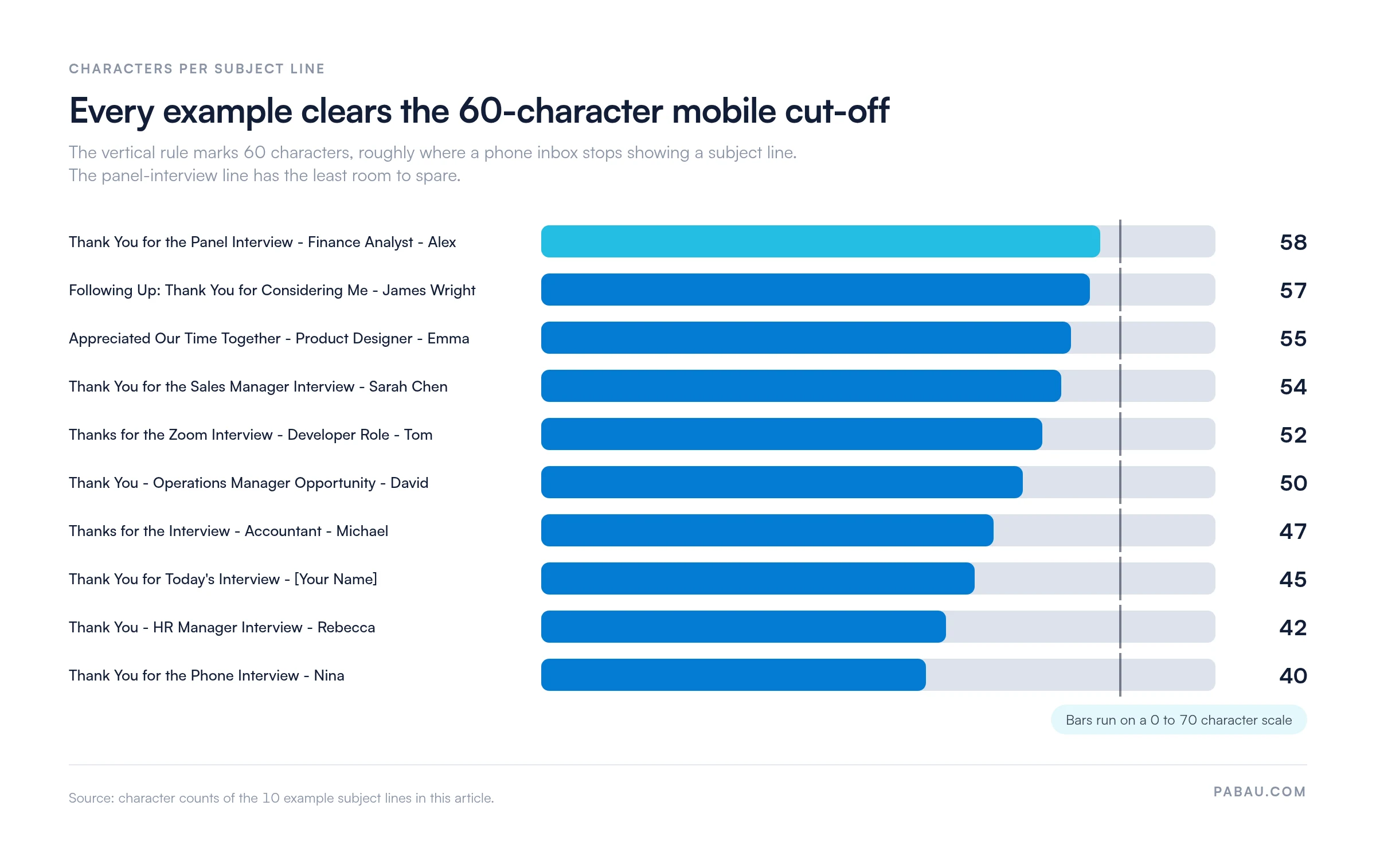
The 10 examples below run from 40 to 58 characters, so all of them display on mobile.
Send the email within 24 hours of the interview, and before 6 PM on a working day.
Match the template to the format you interviewed in, whether that was in person, by phone or on video.
A one-page letter template with fields for the date, the recipient, the subject line and three body paragraphs. Replace the bracketed prompts with your own details, then send it or print it.
Download templateAn email thank-you letter after an interview gets opened or ignored on the strength of its subject line. That line is the only text a hiring manager sees in the inbox list, and a phone shows roughly 60 characters of it.
The formula that works is short. Name the thank you, name the role you interviewed for, add your name, and stay under the character limit. The rest is decoration.
Hiring managers usually read follow-ups in a batch a day or two after interviews, so a vague line like “Following up” sinks under newer mail. Below you’ll find 10 subject lines with their character counts, three full email templates, and the timing that decides whether your note gets read.
A hiring manager scanning an inbox sees your name and one line of text. That line has to answer a single question. Is this worth opening now?
Think of it as the last piece of writing in your application, the way a cover letter template is one of the first. Both get skimmed in seconds, and the opening line decides whether the rest is read.
Strong subject lines carry the same three pieces, in roughly the same order.
Some career sites argue the name is redundant, because the sender field already shows it. That holds up in a personal inbox. It falls apart in a shared careers inbox, where mail arrives under one address and gets forwarded around a panel.
One formatting rule matters more than the wording. Keep the line under 60 characters. Phones and preview panes cut the rest, and the part they cut is the end, which is where your name sits.
Here are 10 ready-to-copy subject lines, grouped by tone and interview type. Swap in the job title and your name, then paste the line straight into your email.
Each line carries the three pieces: a thank-you phrase, the role or context, and a name. They run from 40 to 58 characters, so all 10 display in full on a phone.
Sorted longest to shortest, the 10 lines show how much room each one leaves before the cut-off.
The subject line gets the email opened. These six parts get it read to the end:
Keep the whole email to three or four short paragraphs. Anything longer starts to read like a second interview.
Send the email within 24 hours of the interview. Wait longer and the panel has usually met, compared notes and moved on.
Each format leaves the interviewer with a different impression, so the follow-up should sound different too. Take the closest template and replace the bracketed fields.
Dear [hiring manager name],
Thank you for taking the time to meet me yesterday about the [job title] role. I enjoyed hearing how your team approaches [topic you discussed], and the point you made about [value or priority they mentioned] stayed with me.
Our conversation left me more interested in the role than when I walked in. Working on [project they mentioned] lines up closely with my background in [your relevant experience].
I would welcome the chance to talk about how I could help. Let me know if you need anything else from me.
Best regards,
[your name]
[your phone number]
Dear [hiring manager name],
Thank you for the call this morning about the [job title] role. I appreciated what you shared about [topic you discussed on the call].
Since we spoke, I have been thinking about [specific part of the role]. It is the part of the job I would most enjoy getting into.
I look forward to the next step. Please reach out if any follow-up questions come up.
Best regards,
[your name]
[your phone number]
Dear [hiring manager name],
Thank you for the video call yesterday. It was good to meet you and hear where the team is heading with the [job title] role.
Your description of [project or goal they mentioned] was the part I keep coming back to. My work in [your relevant skill area] would let me contribute to it quickly.
Thank you again for your time. I am looking forward to hearing what happens next.
Best regards,
[your name]
[your phone number]
Use this when you are running several applications at once, or when the practice felt informal.
Thank you for yesterday’s interview for the [job title] role. I am excited about the opportunity, and about the chance to work with your team on [project you discussed]. Looking forward to hearing from you.
Best regards,
[your name]
It still covers the thanks, the role and your interest, in a fraction of the space.
Six things go wrong most often, and each one takes under a minute to catch.
Beyond the basics, three moves separate a note that gets remembered from one that gets filed.
It helps to know where the email actually lands. In most practices, applications arrive in a shared careers inbox rather than one person’s mail. The practice manager sorts them, the clinical lead reads a shortlist, and nobody watches that inbox all day.
That is why being findable beats being polished. On the practice side, interview notes, staff schedules and onboarding tasks usually sit together in one practice management app. Candidate email stays in a separate inbox. A subject line carrying the role and your name is what ties the two together weeks later.
If you are the one hiring, the same discipline helps on your side. A structured question set, like our social worker interview questions, scores every candidate against the same answers. That makes the follow-up emails much easier to weigh.
A candidate’s job ends when they accept. The practice’s job starts there, and it usually spreads across an inbox, a spreadsheet and a wall planner.
Practice management software like Pabau keeps that work next to the schedule it affects. Staff profiles hold documents and qualifications. Roles and permissions decide who sees what. Time-off requests run through the same calendar as patient appointments, so a schedule change never surprises the front desk.
The result is a shorter runway for a new hire. Their schedule, access and paperwork are ready in the system your team already works in, rather than a folder only one person can find.

Pabau holds staff documents, roles and permissions, and time off in the same system as your appointment calendar. New hires are set up and on the schedule without a separate HR tool.

A thank-you email will not rescue a weak interview. What it does is keep you present while the decision is being made, and it costs about 10 minutes.
Spend those minutes on the two parts that decide whether it works. Write a subject line a hiring manager can read at a glance on a phone. Then send it the same day, while the conversation is still fresh.
Hiring rather than applying? Book a demo to see how Pabau keeps staff records, schedules and onboarding in one place.

Writing the rest of the application? Cover letter template gives you the same structure for the first document a hiring manager reads.
Preparing for a nursing interview? LPN interview questions sets out what practices actually ask, so your follow-up can reference the right answers.
Sitting on the hiring side of the table? Social worker interview questions keeps every candidate scored against the same set of answers.
Managing someone once they are hired? Annual review template carries the conversation from the first interview through to the first year.
Yes, send a separate email to each person you met, and change at least one sentence in every version. Panel members forward and compare notes, so identical copies are obvious. If you only have one address, name each interviewer in the opening line.
Start a new email. A fresh thread with a clear subject line is easier to find later than a reply buried under scheduling messages. Reply in the old thread only when the interviewer asked you to.
It is late, but still worth sending while no decision has been made. Skip the apology for the delay and lead with something specific from the conversation. After two weeks, ask about timelines instead.
Name the round so the hiring manager can place you quickly. Thank you for the second interview, followed by the role and your name, does the job. Naming the round also stops the message looking like a duplicate.
Ask the recruiter or the scheduling contact to pass your note on, and copy them in. Most practices route hiring through a shared careers inbox, so a message there reaches the panel. Guessing an address risks a bounce.