



Healthcare policy management software: Pabau vs dedicated tools
Healthcare policy management software helps a healthcare organization write, app...

Last Updated: Oct 29, 2026
PracticeQ pricing starts at $59.90 a month for the Starter plan and $84.90 for Pro, with each extra practitioner adding $25 to $30. Card payments cost another 2.9% plus $0.30 per transaction, on top of a $7.50 monthly fee for the payments account. That processing layer is what pushes the monthly bill well past the plan price.
This guide breaks down both PracticeQ plans, the add-ons, the processing fees, and what a solo therapist or a three-person group pays each month. We also compare it against SimplePractice, and show where practice management software like Pabau fits teams that have outgrown intake-first tools.

PracticeQ publishes two monthly plans: Starter at $59.90 and Pro at $84.90.
Each plan covers one practitioner account plus up to 10 assistant accounts.
Extra practitioners cost $25 a month on Starter and $30 a month on Pro.
Card payments add 2.9% plus $0.30 per transaction, along with a $7.50 monthly payments fee.
At $10,000 of monthly card volume, processing costs nearly four times the Pro subscription.
PracticeQ publishes two plans, both billed monthly. Starter is $59.90 and Pro is $84.90. Each one includes a single practitioner or admin account plus up to 10 assistant accounts, so the price climbs only when you add clinicians.
Three paid add-ons sit outside the plan price. Budget for them separately, because two of them cost more than the subscription itself.
PracticeQ lists no annual billing option, so the monthly rate is the rate. Third-party software directories often carry older figures, which is why the plan sheet at practiceq.com is the only reliable source. Check it before you sign up, since allowances and add-on prices change.
PracticeQ is an EHR and practice management platform built on the IntakeQ infrastructure. IntakeQ launched first as a standalone intake-form and client-questionnaire tool. PracticeQ extended it into a fuller clinical platform covering scheduling, telehealth, billing, and documentation.
The two share the same support portal at support.intakeq.com, which is why a search for IntakeQ pricing keeps surfacing PracticeQ results. If you already use IntakeQ forms and want scheduling and notes on top, PracticeQ is the upgrade path.
The published difference between the two plans is volume. Pro lifts the appointment allowance from 25 to 500 per practitioner, and client form submissions from 25 to 500.
Read those allowances carefully before you pick a tier. A solo therapist seeing 20 clients a week passes Starter’s 25-appointment allowance inside the first two weeks. Pro is the realistic starting plan for anyone carrying a full caseload.
PracticeQ also offers a Business Associate Agreement, which US providers need before any vendor stores protected health information. Confirm the BAA and its scope at sign-up rather than assuming it applies to every add-on.
This is the layer that catches practices off guard. PracticeQ charges 2.9% plus $0.30 on every card payment, along with $7.50 a month for the payments account. ACH bank transfers cost 1%, with a $10 minimum per transfer.
PracticeQ does not name the processor behind PracticeQ Payments in its published documentation. Its support articles compare PracticeQ Payments against Stripe and Square rather than identifying either one as the engine, so treat the processor as undisclosed.
The arithmetic matters more than the percentage does. The chart below models three practice shapes at PracticeQ’s published rates, so you can see which half of the bill grows.
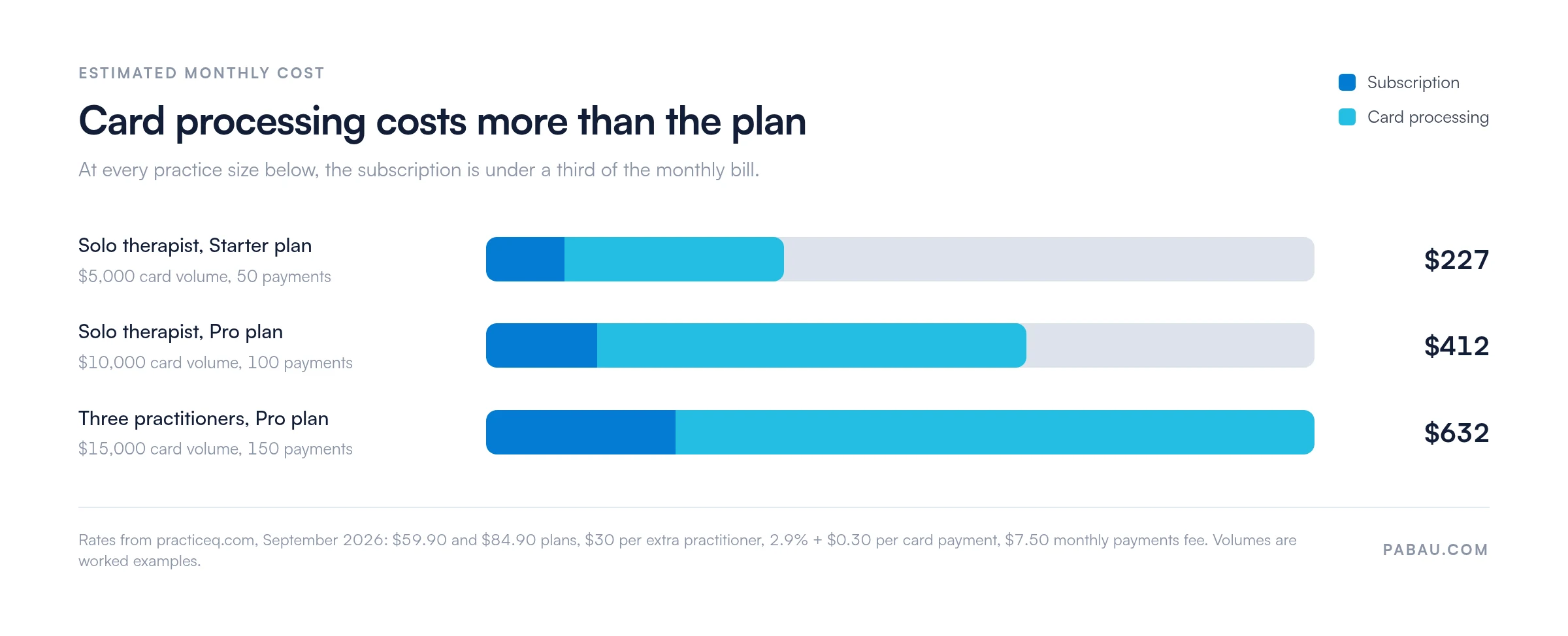
Every scenario lands the same way. Processing is the larger share of the bill, and it keeps growing with revenue while the subscription stays flat. A practice collecting $15,000 a month pays more in card fees than three Pro seats cost.
PracticeQ keeps the current schedule in its official fee breakdown, and the rates there can change. Check your own account settings too, since older accounts sometimes sit on legacy rates.
Multiply your monthly card volume by 2.9%, add $0.30 per transaction, then add $7.50. A practice collecting $10,000 across 100 payments pays about $327 in processing, nearly four times the $84.90 Pro subscription. Budget the total, not the plan price.
Yes. PracticeQ offers two weeks free with no credit card required, as published on its pricing page. Two weeks is enough to build a few intake forms and run test bookings, but not enough to see a full billing cycle.
Spend the trial on the workflows that are hardest to migrate later: form logic, note templates, and how payments reconcile against invoices. If you are evaluating for a group, test multi-practitioner scheduling rather than the solo view.
SimplePractice is the competitor therapists compare PracticeQ against most often. Both target mental health practitioners, so the overlap is direct and the pricing models are easy to line up.
The cheaper option flips depending on practice shape. SimplePractice undercuts PracticeQ for a solo practitioner at entry. PracticeQ is far cheaper for a small group, because each extra practitioner costs $25 to $30 rather than $74.
On Capterra, PracticeQ holds a 4.5 out of 5 rating from 73 verified reviews, while SimplePractice sits at 4.5 out of 5. Both score well, so the decision comes down to workflow fit. Reviewers credit PracticeQ for intake form customization and SimplePractice for its therapy-specific interface.
Our side-by-side software comparisons cover the feature detail a pricing table leaves out. Neither platform scales comfortably for larger multi-specialty or aesthetic clinics.
For solo therapists and small mental health practices, PracticeQ earns its price. The intake form engine is its strongest differentiator, carrying the conditional logic and automation it inherited from IntakeQ.
Review volume is thin, so read the scores with care. Capterra shows 4.5 out of 5 from 73 verified reviews, and the G2 listing currently carries a single review. One review is far too little to support any claim about a trend.
PracticeQ pricing represents fair value for its target buyer: a solo therapist or counselor who needs a customizable intake-to-notes workflow. Practices that also run stock, marketing campaigns, or several locations will hit the ceiling sooner than the price suggests.
Two close substitutes appear in almost every PracticeQ shortlist. If your caseload leans toward allied health, our Jane App pricing breakdown is the closer comparison. For therapy teams weighing a cheaper all-in-one, start with Carepatron pricing.
The closest direct competitor, with stronger brand recognition and deeper insurance billing tools. Entry pricing is lower, but group pricing is not: $74 per additional practitioner is more than double PracticeQ’s rate. For the plan-by-plan figures, see our SimplePractice pricing guide.
If your main need is intake forms and client questionnaires with little scheduling complexity, the standalone IntakeQ product is cheaper and does that job well. Once you need scheduling and clinical notes, PracticeQ becomes the natural upgrade.
A therapy-first platform covers intake, scheduling, and notes well. Add retail stock, injectables, campaign marketing, or a second location, and those jobs drift out into spreadsheets and separate tools. Pabau keeps them inside one client record instead.
PracticeQ focuses on forms and documentation for mental health practitioners. Pabau covers scheduling, digital intake and consent, charting, inventory, payments, marketing, and multi-location reporting in one platform. Pricing starts from $62 a month for one user, and it scales by location and user count.
There is no tier that locks a feature away, so form volume and campaign sends never push you onto a pricier plan. That removes the allowance arithmetic that PracticeQ’s Starter plan forces on a growing caseload.
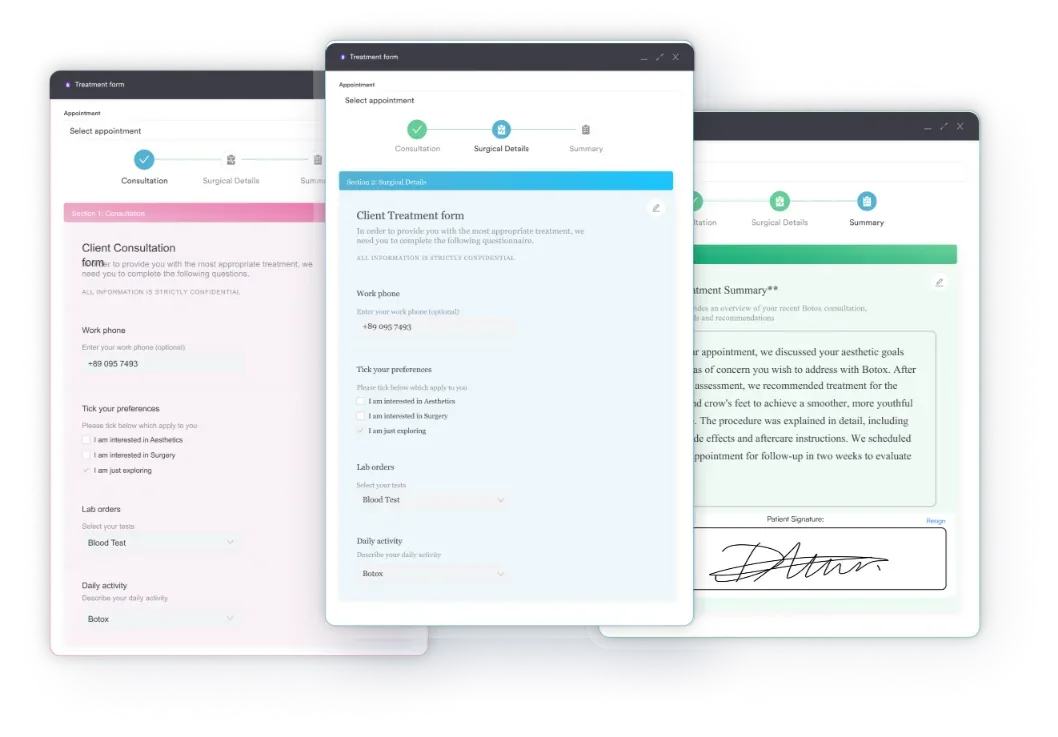
Pabau holds a 4.7 out of 5 rating on Capterra from more than 600 verified reviews. Aesthetic clinics, wellness practices, and multi-discipline teams are the strongest fit. That matters most where counseling sits alongside treatments that need stock control and photo records.

Pabau runs scheduling, clinical notes, billing, inventory, and marketing from one client record. Every subscription includes every feature, so your monthly cost tracks your team size rather than your feature list.

The plan price is the smaller half of this decision. At $59.90 or $84.90 a month, PracticeQ’s subscription is competitive. Card processing at 2.9% plus $0.30 turns a $10,000 collection month into roughly $412 of total cost, so price the whole bill before you compare.
For a solo therapist or a two-person counseling practice, that total is reasonable and the intake forms are the strongest part of the product. For a practice adding treatments, stock, or locations, the ceiling arrives sooner than the monthly rate suggests.
Book a demo to see how Pabau prices by location and user count, with every feature included at every level.

Want the wider SimplePractice shortlist? SimplePractice competitors ranks the platforms therapists switch to, and what each one charges per clinician.
Weighing two therapy platforms head to head? Carepatron vs SimplePractice compares plan limits, billing tools, and total monthly cost.
Curious how Pabau stacks up against the field? Pabau competitors and alternatives sets out where each platform fits by practice type and size.
PracticeQ publishes two monthly plans: Starter at $59.90 and Pro at $84.90. Each one includes a single practitioner or admin account plus up to 10 assistant accounts. Extra practitioners cost $25 a month on Starter and $30 a month on Pro.
A solo practitioner pays $59.90 or $84.90 a month, depending on the plan. Add $25 to $30 for each extra practitioner and $7.50 for the payments account. Card payments then cost 2.9% plus $0.30 each, so a three-practitioner Pro practice collecting $15,000 a month pays roughly $632 in total.
Yes. PracticeQ offers two weeks free with no credit card required. Two weeks covers form building and test bookings, but not a full billing cycle, so decide what you want to test before you start.
Card payments cost 2.9% plus $0.30 per transaction, with a $7.50 monthly fee for the payments account. ACH bank transfers cost 1%, with a $10 minimum per transfer. PracticeQ does not name the processor behind PracticeQ Payments in its published documentation.
PracticeQ is built on the IntakeQ platform and shares its support infrastructure. IntakeQ is the standalone intake-form tool, and PracticeQ extends it with scheduling, EHR notes, telehealth, and billing. Both use the same support portal.
SimplePractice is the closest substitute for therapy-specific workflows, and standalone IntakeQ suits intake-only needs. Carepatron and Jane App come up for allied health teams. Pabau fits practices that also need inventory, marketing, and multi-location reporting.






