Massage Gift Card Template
A massage gift card template is a fill-in-the-blank certificate you customize wi...

23
Last Updated: Sep 11, 2026
Vaccine management systems record every dose a practice gives, schedule the doses still due, and flag lapsed courses before a patient misses protection.
That matters because vaccine management rarely stays simple. A single patient might need a three-dose hepatitis B course, an annual flu shot, and travel vaccines timed to a departure date. On paper or in a spreadsheet, batch numbers get skipped, follow-ups slip, and staff recheck the same records across several files.
Practice management software like Pabau keeps that work inside the patient record. Pabau logs each dose with its batch number, expiry date, administration site, and clinician. The same record calculates the full course timeline and suggests vaccines by destination for travel patients.

A vaccine management system replaces paper and spreadsheets with one record of every dose given, scheduled, lapsed, or canceled.
Pabau covers vaccine records, dose scheduling, a vaccine inventory log, chart previews, and follow-up tracking inside the patient record.
Pre-set schedules follow national immunization guidelines, so dose timing stays compliant without redrawing timelines by hand.
Destination-specific suggestions help travel patients get the right vaccines early enough to be protected before departure.
The five-step vaccine setup takes a practice from switching on the module to recording its first dose.
Practices need a dedicated vaccine management system because manual tracking fails at the details that decide whether a patient stays protected. The failures show up in four places:
Each slip has a knock-on cost. Miss a hepatitis B follow-up and the patient may need the whole course restarted. Record the wrong batch number and a product recall turns into hours of searching through stock logs.
Travel health raises the stakes. The CDC Yellow Book tells clinicians to check whether a traveler has enough time to complete a vaccine series before departure. A course booked too late leaves the patient abroad without full protection.
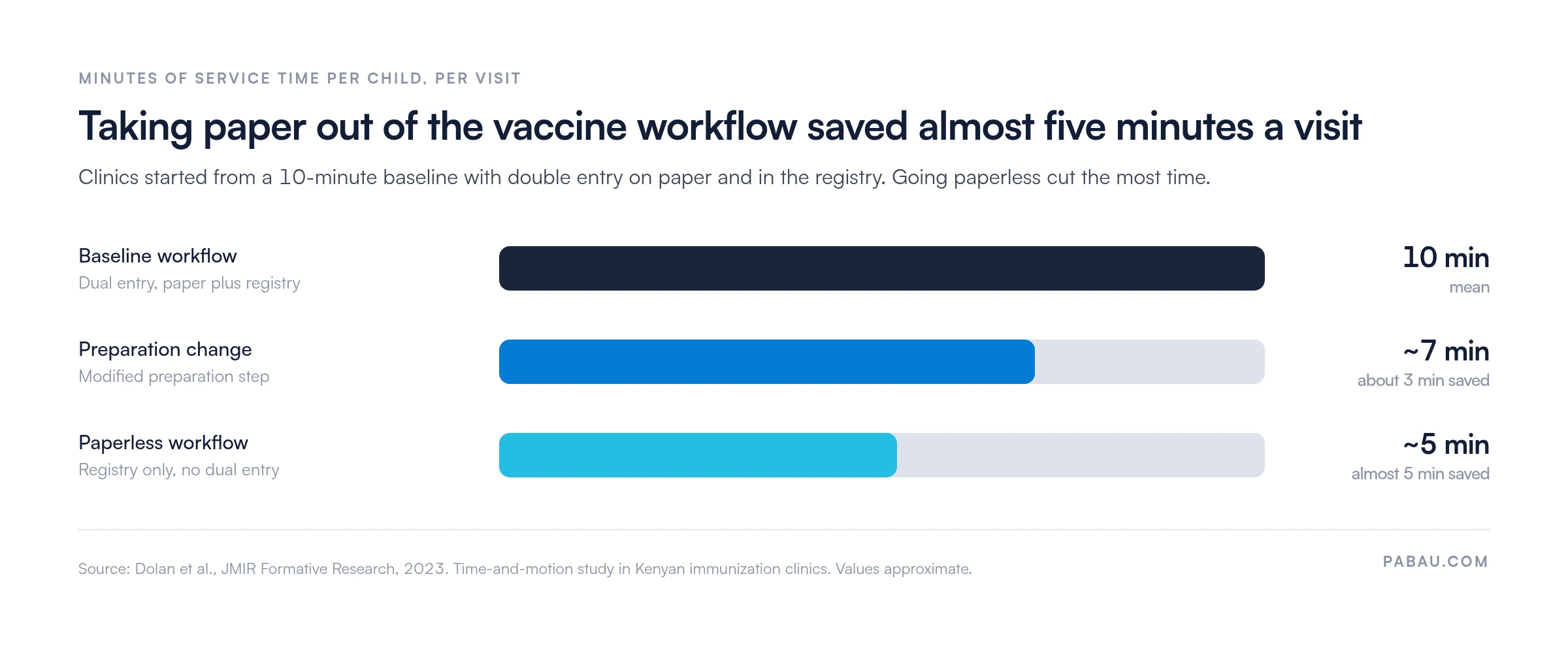
Paper also costs time on routine visits. A 2023 time-and-motion study in JMIR Formative Research timed Kenyan immunization clinics that entered each visit on paper and in an electronic registry. Service took a mean of 10 minutes per child. Changing the preparation step saved about three minutes, and dropping paper entirely saved almost five minutes.
The chart below shows how much of each visit went on duplicate record-keeping:
Across a full day of immunization appointments, five minutes per patient adds up to hours your team gets back for patient care.
Pabau’s vaccine inventory log records the batch number, expiry date, administration site, and clinician for every dose, directly in the patient record.
Each detail sits in a standardized field rather than a free-text note. Staff can’t skip the batch number or write it three different ways, so the record stays consistent from one clinician to the next.
| Field | What it captures |
|---|---|
| Batch number | The manufacturer lot the dose came from, so you can trace every patient who received it. |
| Expiry date | The expiry printed on the vial or pack, logged at the point of administration. |
| Administration site | Where on the body the dose went, such as the left deltoid. |
| Clinician | The team member who gave the dose, for accountability and audit. |
Those four fields answer the questions an auditor or a recall notice asks first. When a manufacturer recalls a batch, you search one field instead of paging through paper registers. When a patient asks which arm their last booster went in, the answer is already on screen.
Pabau’s vaccine management system combines records, scheduling, logging, and follow-up tracking in one place. The capabilities break down like this:
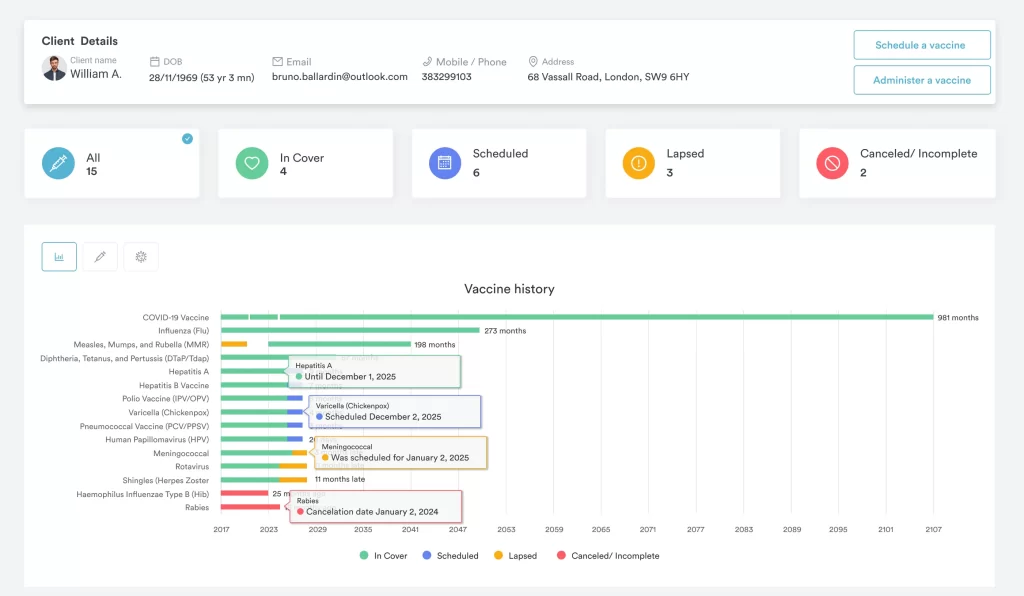
Pabau’s vaccine dashboard groups each patient’s vaccines by status, which turns follow-ups into a quick scan:
Practices running group travel-vaccination days can pair this with Pabau’s Classes feature to manage group sessions and waitlists together.
Setting up Pabau’s vaccine management system takes five steps: enable the module, add your vaccines, link diseases, build schedules, then record each dose.
Once setup is done, vaccines appear as options in the Client Card. Pabau calculates each timeline automatically and saves every logged detail straight to the patient’s record.
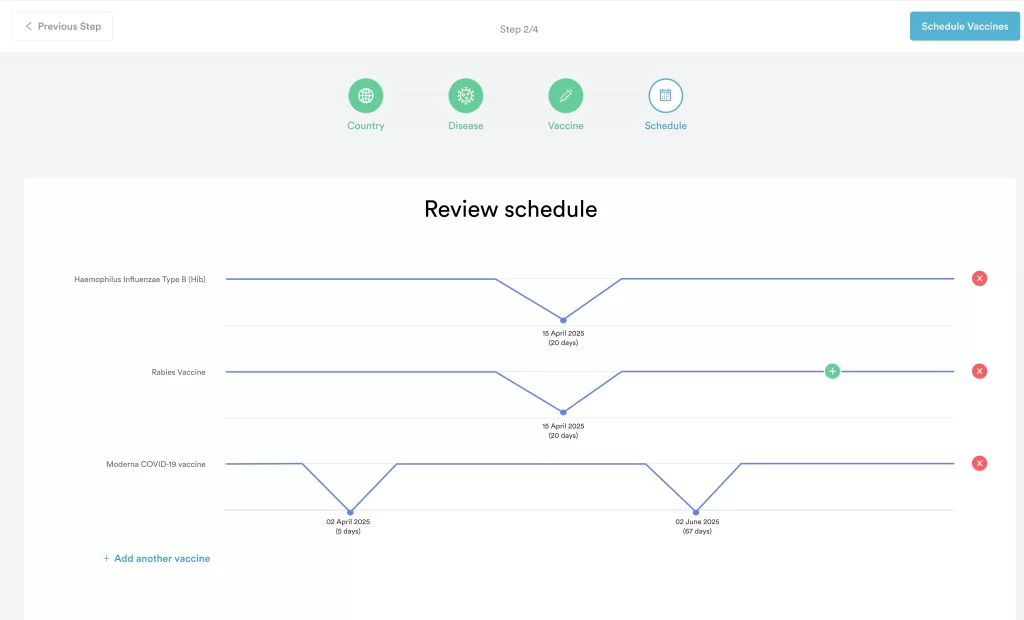
Pabau’s scheduler walks staff through country, disease, vaccine, and schedule, then shows the calculated dates for review:
We see practices get the most from step two when they add their full vaccine list up front. Every later booking then pulls from the same list, so records stay consistent from the first dose.
A practice giving vaccines usually runs bookings, patient records, and invoices somewhere already. Keeping immunizations in a separate spreadsheet means staff copy details between systems and check two places before every appointment.
Pabau puts vaccine management inside the same practice management software your team uses for the rest of the day. That means:
Every Pabau subscription includes every feature, vaccine management included. New customers get structured onboarding to set up vaccine lists and schedules properly from day one.

Pabau logs batch numbers, expiry dates, and clinicians for every dose and calculates each course timeline. Your team spends less time checking records and more time with patients.

A vaccine management system earns its place the first time a batch is recalled or a booster comes due. Scattered paper and spreadsheets become one auditable timeline per patient, and nobody has to reconstruct it under pressure.
If your practice still tracks vaccines by hand, start with the fields you can’t afford to lose: batch number, expiry, site, and clinician. Pabau’s five-step vaccine setup captures all four from the first dose, without adding another tool to your day.
Book a demo to see how Pabau keeps vaccine courses on schedule and records audit-ready for your practice.

Running group vaccination days? Manage group sessions effortlessly with Pabau’s Classes shows how to book group sessions and handle waitlists in one place.
Giving vaccines on the move? The latest version of Pabau GO explains how practitioners open the Client Card and record treatments from an iPhone or iPad.
Want more personal patient follow-up? Introducing Care Plus covers the additional patient care features available on top of the core platform.
A vaccine management system is software that records each dose a practice gives, schedules upcoming doses, and flags lapsed courses. Pabau keeps this inside the patient record alongside bookings and billing.
Yes. Pabau logs the batch number, expiry date, administration site, and clinician for every dose in standardized fields. That keeps records consistent and makes recall searches fast.
Yes. Pabau suggests vaccines by destination and calculates each dose date, so travel patients can complete their course before departure.
Yes. Every Pabau subscription includes every feature, so vaccine scheduling, logging, and chart previews come at no extra cost. Pricing scales with your locations and users, not with features.