Massage Gift Card Template
A massage gift card template is a fill-in-the-blank certificate you customize wi...

19
Last Updated: Sep 11, 2026
Med spa membership software sells membership plans, charges the recurring fee automatically, tracks what each member has redeemed, and reports on membership revenue. The strongest setups run all four jobs in the same system as patient records, booking and payments.
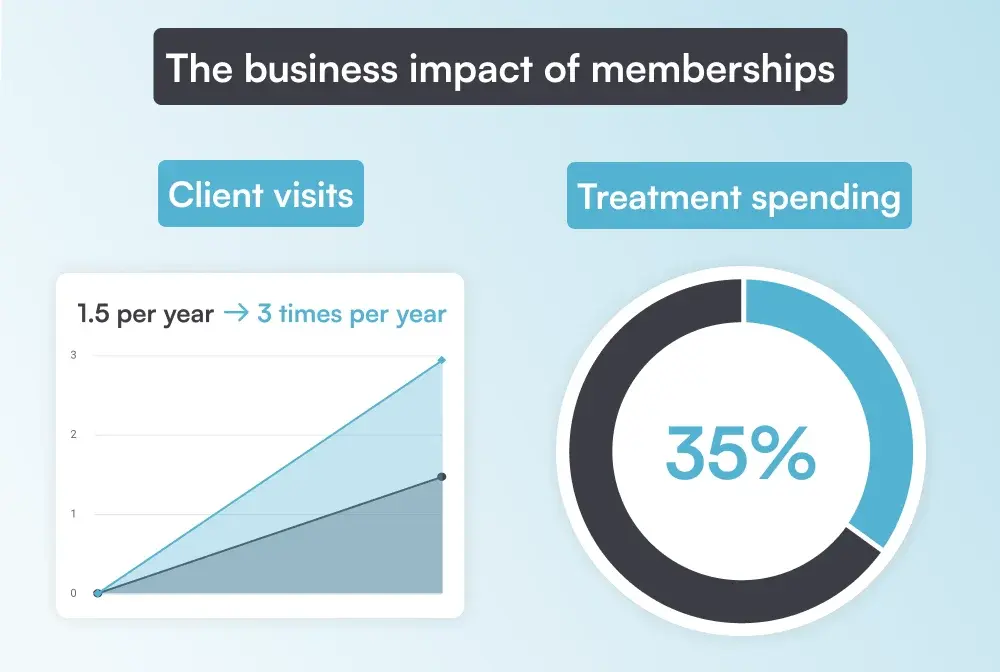
The business case is well documented. According to the American Med Spa Association, members visit almost three times a year, against just under 1.5 visits without a membership. They also spend 35% more on treatments.
Practice management software like Pabau handles this through its Memberships feature. Pabau Memberships covers what we call the five membership moments. Those are sign-up, the recurring charge, redemption, renewal and failed payments, and changes like an upgrade, freeze or cancellation. Each one is recorded in the patient’s client card.

Med spa membership software sells plans, bills members on a set cycle, and records each redemption against the patient record.
Members visit almost twice as often and spend 35% more on treatments, according to the American Med Spa Association.
The five membership moments are sign-up, the recurring charge, redemption, renewal and failed payments, and upgrades, freezes or cancellations.
Moments 4 and 5 are the first to break on a spreadsheet, so test failed payments, pauses and cancellations in any demo.
Pabau runs memberships from the client card, bills weekly, monthly or yearly through Stripe, and includes the feature in every subscription.
Med spa membership software sells membership plans, charges members automatically on a set cycle, and records each redemption in the patient’s file. That keeps revenue and allowances accurate.
Memberships, subscriptions and recurring billing are three names for the same model. What separates a med spa tool from generic membership management software, the kind built for gyms or associations, is the treatment allowance.
A gym sells access. A med spa sells, say, one Hydrafacial a month plus 10% off injectables. The software has to know which of those each patient has already used.
Those allowances also sit next to clinical detail: consent forms, treatment notes and before-and-after photos. That puts member data under HIPAA, the US health privacy law, which gym platforms were never designed around.
So which software do med spas use for memberships? Most run them inside their med spa practice management software, the system that already holds the EMR, the calendar and the card on file. A standalone membership tool means reconciling two patient lists every month.
Memberships pay off because members visit about three times a year instead of just under 1.5, and spend 35% more on treatments.
Those figures come from the American Med Spa Association, and they compound. More visits per patient fill the calendar without extra marketing spend, and a higher spend per visit lifts revenue on each of those extra appointments.
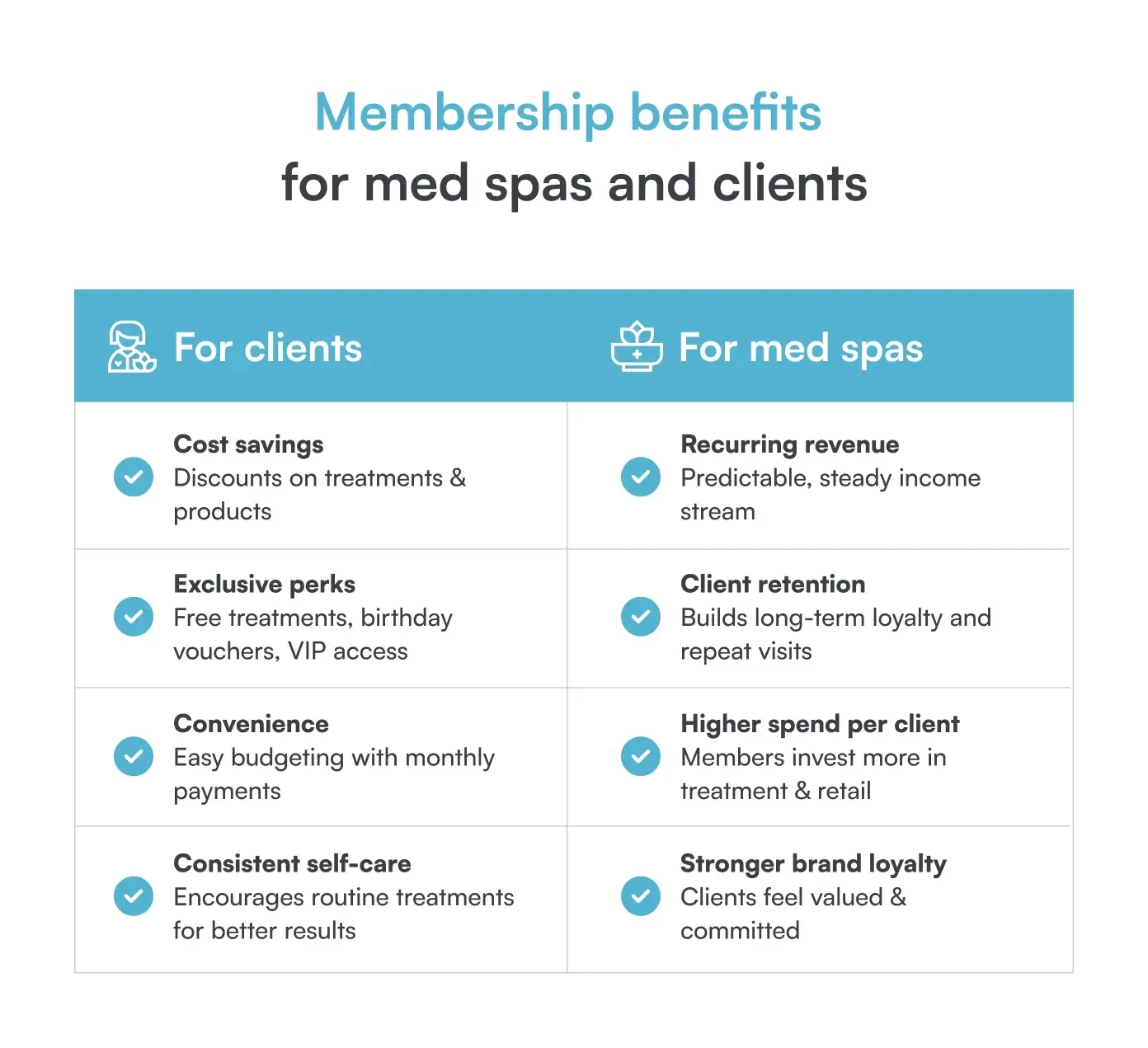
The other half of the case is cash flow. A patient on a $150 monthly plan spreads the cost of treatments instead of paying for a course upfront. You get a predictable income line to plan staffing and stock around.
Designing the program itself, from tier structure to pricing, is a strategy question for a separate guide. This one assumes you have decided to run memberships and need software that can carry them.
The five membership moments are sign-up, the recurring charge, redemption at the appointment, renewal and failed payments, and changes like an upgrade, freeze or cancellation.
Every membership passes through all five, usually many times a year. The table maps each moment to what the software must do. It also shows what breaks when a spreadsheet or a separate payments app does the job.
Laid out as a sequence, the pattern is clear. The first three moments are routine, and the last two are where programs lose members and money.
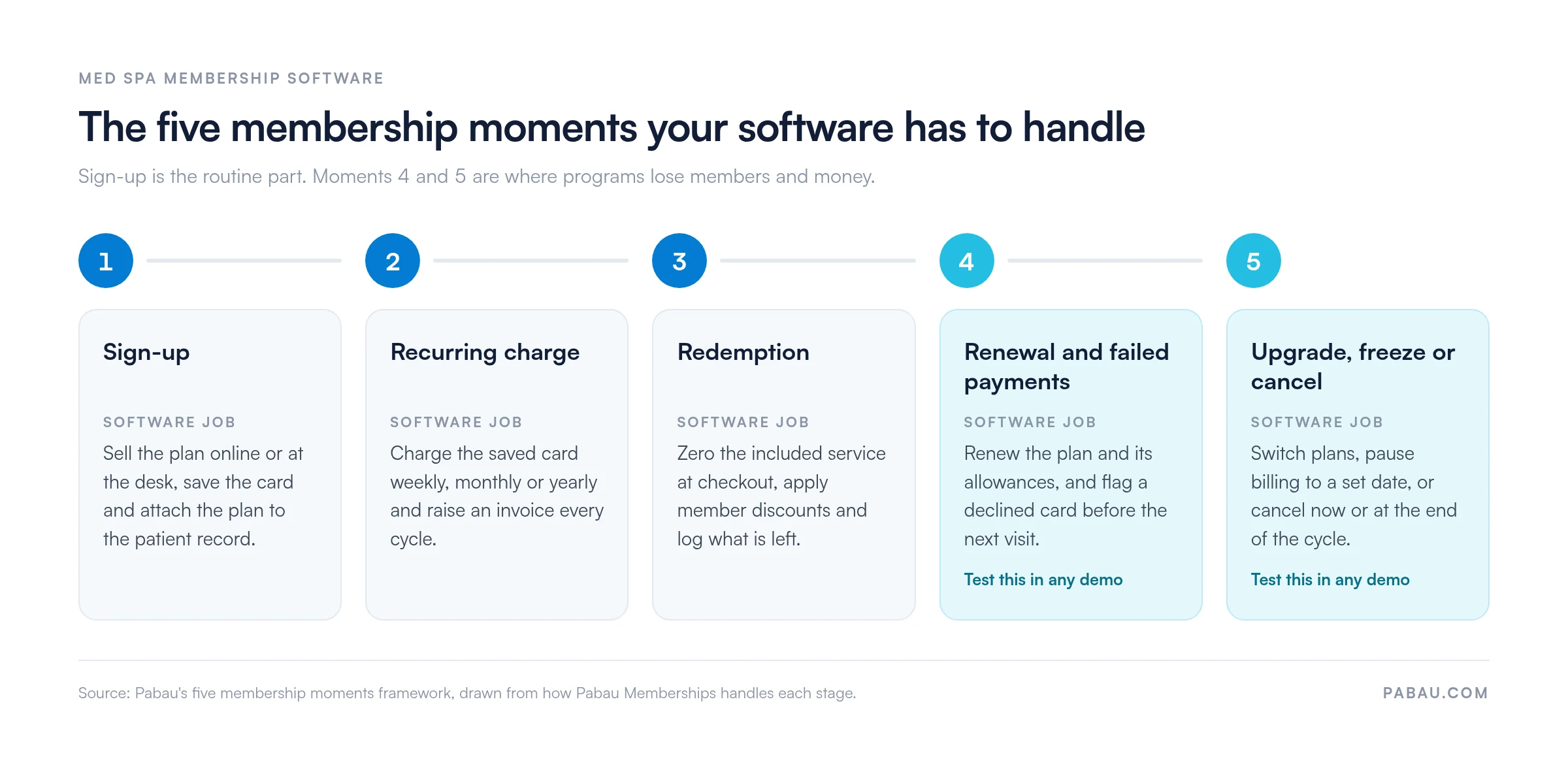
Sign-up. One sale should create the membership, save the card and link both to the patient record. In Pabau, patients choose a plan through online booking or staff sell it at checkout. The first payment can run straight away or on a set date.
The recurring charge. This is the job membership billing software is bought for. Pabau charges the saved card weekly, monthly or yearly through its Stripe integration, and raises an invoice for every billing cycle.
Redemption. Included services come off at zero and member discounts apply automatically, online or at the desk. Because the membership sits in the patient profile, your med spa CRM data and your redemption log are one record. A service booked before a plan ends but held after it is charged as normal.
Renewal and failed payments. Pabau renews active plans automatically, and included service allowances renew with each billing cycle. Each member’s Event Log shows successful and unsuccessful payment attempts, so the front desk can raise a declined card at check-in.
Unused sessions are a policy decision. Ask any vendor whether allowances roll over or expire, and whether the system enforces that rule or leaves it to staff.
Upgrade, freeze or cancel. From the client card, staff can move a patient to another plan or pause it indefinitely or until a date. Staff can also cancel it immediately or at the end of the billing period. A paused member isn’t charged and gets no member discounts until the plan resumes.
In practices we onboard, the membership questions that take longest to settle are rarely about price. They are about rollover, pauses and what happens when a card declines.
Cancellation has a legal side too. US state automatic renewal laws, California’s being the best known, require clear renewal terms and an easy way to cancel. Check your state’s automatic renewal law before you publish membership terms.
Setting up memberships in Pabau takes six steps, from creating the plan in Setup to recording a member’s first redemption in their client card.
Membership billing runs through Pabau’s Stripe integration, so connect Stripe before you start.
Finalize the basics before you sell. Once a plan has its first subscriber, its basics and pricing can’t be edited, and later changes only apply to new sales.
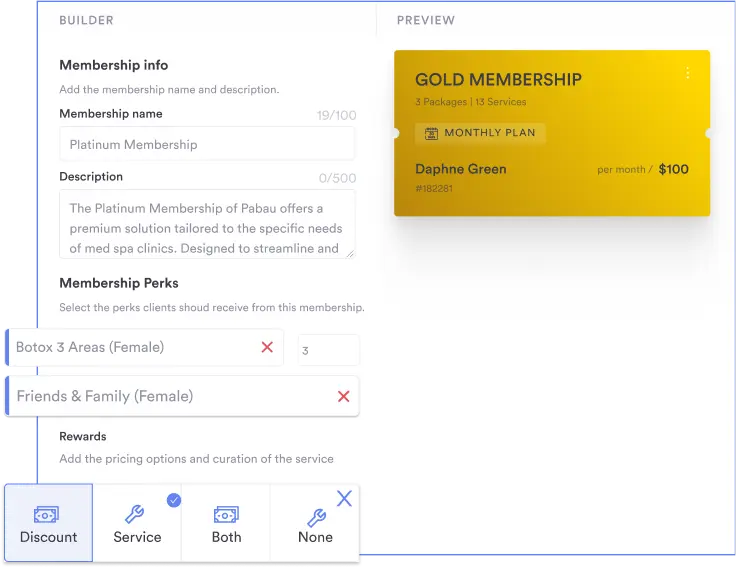
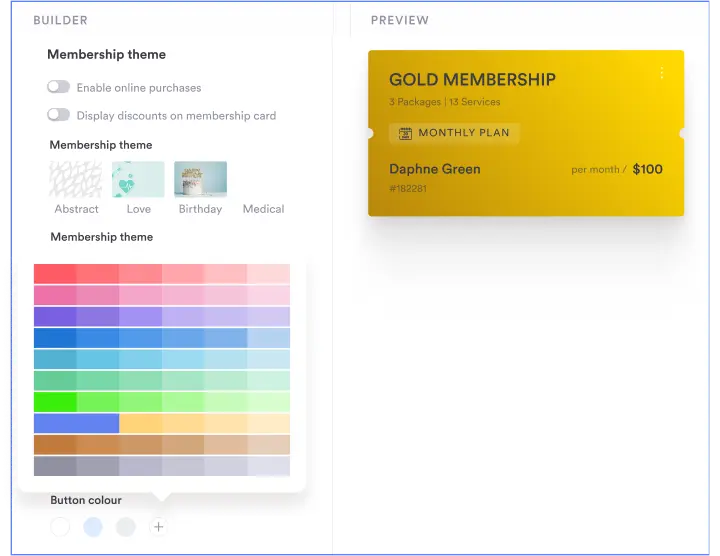
Want to see the builder before you set up your own plans? Take the interactive tour of Pabau Memberships.
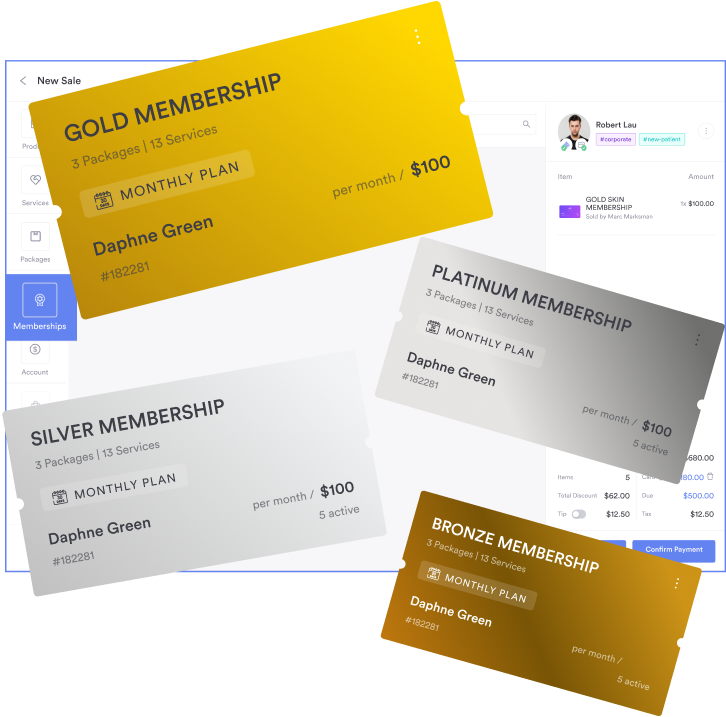
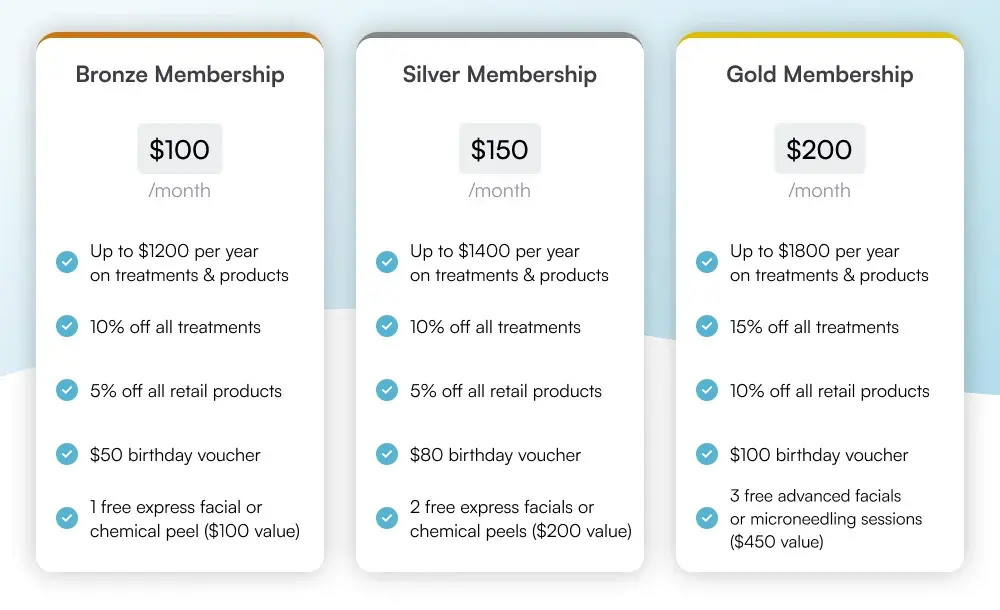
The example below shows a bronze, silver and gold structure priced from $100 to $200 a month. Discounts, birthday vouchers and free facials step up with each tier.
When you look for spa membership ideas, change one lever per tier so patients can see what the extra money buys. Each of these perks can be set up in Pabau as a service, discount, credit or custom benefit.
Pabau stores each membership in the patient’s client card, with its tier, status, renewal dates and payment history in one view. Every plan also rolls up into one membership dashboard.
Color-coded statuses show whether a plan is active, paused, scheduled to cancel or expired. View Usage shows which included services the patient has already used, on a calendar.
Because memberships live in Pabau’s practice management software rather than a separate tool, billing, scheduling and reporting all draw on the same record.
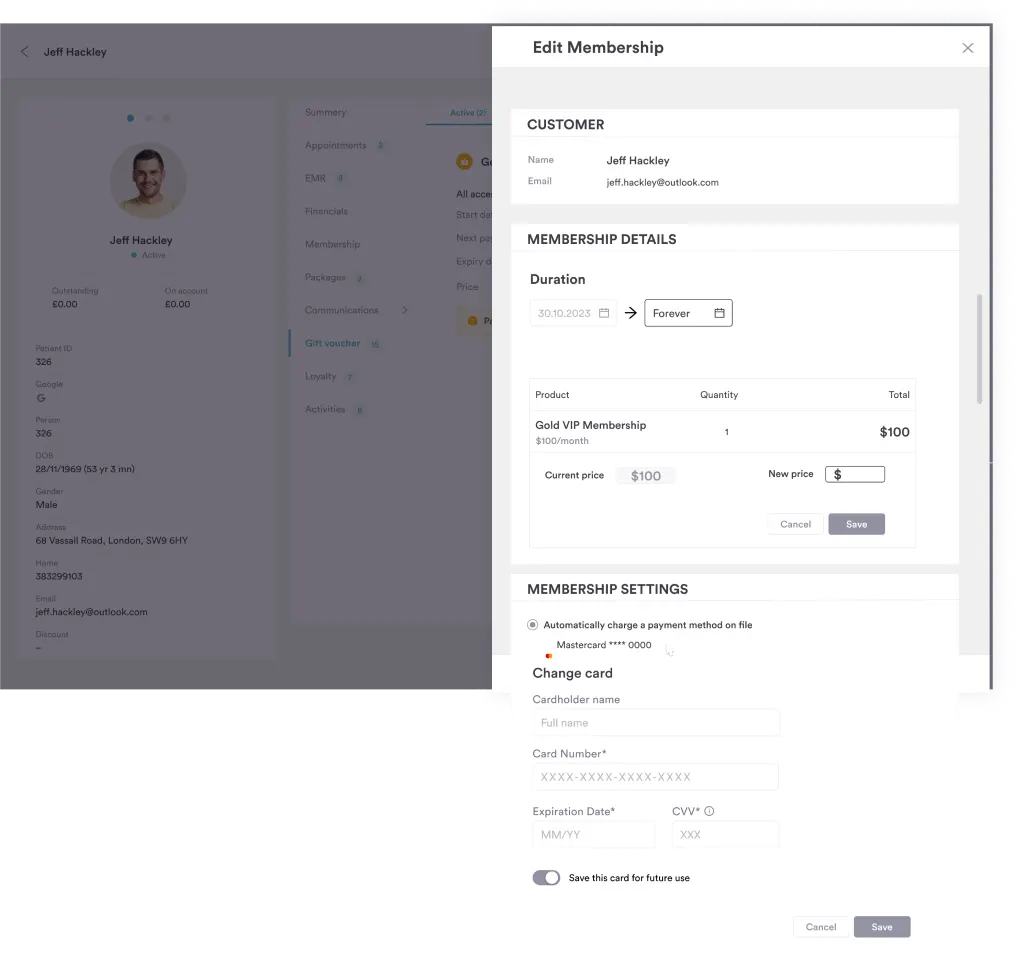
The membership dashboard tracks:
Fees are charged automatically on the cycle you set, and plans renew without a reminder from the front desk. You can also export the members list for your accountant or a patient campaign.
Look for med spa membership software that handles all five membership moments inside the same system as your patient records, booking and payments.
Use this checklist in a demo, and ask the vendor to show each item live on screen:
Payment-first spa membership software tends to stop after the recurring charge, so give items three to five most of your demo time.
Pabau handles sign-up, billing, redemption, pauses and cancellations inside the client card. Every Pabau subscription includes every feature, so memberships carry no add-on fee.
Without one system, a membership program runs across three tools. A payments app holds the card, a spreadsheet tracks allowances, and the EMR records the visit. Each renewal and cancellation then gets copied between them by hand.
Pabau puts all five membership moments in the client card. Patients sign up through online booking and Stripe bills them on schedule. Staff record redemptions, pauses and cancellations where the treatment notes already live.
The membership dashboard then shows what the program earns and who is leaving, so you can adjust a tier from the numbers. Structured onboarding sets up your plans, perks and Stripe connection before the first member signs up.

Pabau Memberships sells plans through online booking, bills members automatically, and tracks each redemption, pause and cancellation in the patient record. Your team stops reconciling spreadsheets against payments.

Sign-up is the moment every vendor demos, and it is the least likely to go wrong. Programs lose members and revenue at moments 4 and 5, when a card declines or a patient asks to pause.
So test the awkward moments first. Ask to see a declined payment, a freeze and a mid-cycle cancellation on a live account. If each takes one screen, the routine moments will look after themselves.
Book a demo to see how Pabau handles all five membership moments for your med spa.

Setting the rules members sign up to? Appointment cancellation policy: what to include and how to enforce it covers notice windows, late fees and cards on file.
Running group sessions for members? Class scheduling software for practices explains recurring group sessions with seat limits, payments and reminders.
Treating members away from the front desk? The latest version of Pabau GO, our iOS app shows how practitioners open the client card and take payment from an iPhone.
A spa membership is a monthly or yearly plan where the patient pays a fixed fee for set treatments, discounts or perks each cycle. The fee is charged to a saved card automatically. At each visit, included treatments come off the bill until the next cycle renews the allowance.
A med spa membership contract should state the fee, the billing cycle, what each cycle includes, and whether unused treatments roll over or expire. It should also set the minimum term, the notice needed to cancel, and your freeze policy. Check your state’s automatic renewal law before patients sign.
For a med spa, the best membership management software runs memberships inside the same practice management system as patient records, booking and payments. Billing, redemptions and cancellations then update one record. Pabau works this way, with each plan held in the patient’s client card.
Free recurring-payment tools can collect a monthly fee, but they aren’t built to track treatment allowances or hold patient records. Pabau has no free plan. Pabau offers a demo and structured onboarding instead, so plans, perks and billing are set up correctly from day one.
Yes. In Pabau, patients choose a plan, enter or reuse a saved card, and finish the purchase inside online booking. Memberships can also appear there as an upsell. Future invoices are then generated automatically.