Medicare charting cheat sheet
A Medicare charting cheat sheet is a one-page reference that lists what Medicare...

4
Last Updated: Oct 21, 2026
Aceto vs tomedo is a choice between two KBV-certified German practice systems that both handle GKV and PKV billing. Pick aceto if your practice mixes Windows, Mac and Linux machines or wants a cloud option for home-office access. Pick tomedo if your team works on Macs, iPads and iPhones and wants a monthly rental it can cancel.
The old shortcut of Windows for aceto and Mac for tomedo no longer holds. Aceto is written in Java and runs natively on all three desktop systems, and zollsoft launched tomedo.air for Windows in October 2025. This guide compares features, KV billing, deployment, pricing and data privacy. It also shows where Pabau, the cloud practice management system we make, fits for private-pay practices.

Aceto and tomedo are both KBV-certified for statutory (GKV) and private (PKV) billing, so the choice turns on platform, deployment and contract.
Aceto is Java-based and runs natively on Windows, macOS and Linux, with ACETOcloud and web modules for remote access.
Tomedo is built for Apple hardware with native iPhone and iPad apps, and tomedo.air now brings it to Windows for five specialties.
Tomedo is rented monthly with updates included, while aceto doesn’t publish its pricing model, so ask for a written quote.
Pabau suits private-pay and aesthetic practices that don’t need KV billing and want one cloud system on every device.
Aceto and tomedo serve the same buyer: German GP and specialist practices that need certified billing and clinical documentation. They differ on architecture, device support and how you pay for them.
Aceto is German practice software from ACETO Softwareentwicklung GmbH in Munich, built for GP and specialist practices in the statutory health insurance system. It covers patient records, scheduling, documentation and billing for both GKV (Gesetzliche Krankenversicherung) and PKV (Private Krankenversicherung) patients.
Aceto suits small and mid-sized practices that want a locally installed system with a cloud layer on top. The vendor publishes its platform and cloud options on the aceto website, but not its prices.
Tomedo is practice software from zollsoft GmbH, built for macOS and used in German GP and specialist practices. It pairs the Mac desktop app with native iPhone and iPad apps. Doctors can dictate findings, check appointments and capture photos away from the desk.
Since October 2025, zollsoft has offered tomedo.air for practices that depend on Windows. Its coverage is limited to five specialties, so confirm yours is included before planning a rollout. Check gematik Telematikinfrastruktur (TI) connectivity with zollsoft for the version you would run.
Both platforms cover the functional baseline expected of German Praxissoftware. The differences sit in device support, deployment and remote access.
KV-Abrechnung is the process of submitting billing data to the Kassenärztliche Vereinigung, and every German practice system has to support it. Aceto and tomedo both handle GKV and PKV billing, which meets the certification requirement that the KBV (Kassenärztliche Bundesvereinigung) sets for practice software.
The practical difference is where billing runs. Tomedo’s billing sits inside its macOS app, or inside tomedo.air on Windows. Aceto’s billing runs in the same Java application on whichever system your practice uses.
Neither vendor publishes a detailed billing feature matrix online. Ask for a demonstration of KV submission and TI connector certification before you commit to either.
Deployment is now the sharper difference between aceto and tomedo. Both run locally, both offer a cloud route, and each supports a different mix of devices.
A practice with mixed hardware, or one that wants home-office access, will find aceto the easier fit. An all-Apple practice gets the most from tomedo’s native apps. A Windows-only practice can run tomedo.air if its specialty is covered, and aceto if it isn’t.
Tomedo runs on a monthly rental. There is no license to buy, you can cancel at any time, and updates are included. The Server-App and each client app are billed separately, so the monthly cost grows with the devices you connect. Aceto doesn’t publish its pricing model, so ask for a written quote.
Budget for hardware as well as software. A Windows practice no longer needs new Macs for tomedo if tomedo.air covers its specialty. If it doesn’t, tomedo still means Apple hardware, while aceto runs on the machines you already own.
Both aceto and tomedo operate under the DSGVO (Datenschutz-Grundverordnung), the German name for the GDPR. For German practice software it is a baseline, not a differentiator. The questions that matter are where data is hosted and whether it ever leaves German jurisdiction.
Switching practice software disrupts the whole team. Onboarding and ongoing support matter as much as features.
Ask each vendor how they migrate data from your current system. The answer tells you more about the realistic timeline than any marketing estimate.
German practice software integrations center on regulatory infrastructure rather than marketing or growth tools.
Both ecosystems are built around German regulatory interoperability. If you rely on international marketing, payment or telehealth tools, ask each vendor which connectors exist before you sign.
Aceto and tomedo aren’t listed on major English-language review platforms such as Capterra, G2 or Trustpilot. That is common for German-market practice software, which buyers usually judge through German-language channels, vendor demos and peer recommendations.
For independent practitioner views, German medical forums and regional KV resources tend to help more than international review sites. Ask each vendor for reference practices of a similar size and specialty to yours.
Before committing to aceto or tomedo, ask the vendor for a live data migration scoping session. Moving patient records, appointment history and billing data from your current system is where most switching projects slow down. If a vendor can’t set out a clear migration plan in the first conversation, treat that as a warning sign.
Start with billing, then look at the devices your team uses every day. The decision path below shows how those two answers point to aceto, tomedo or a system built for private billing.
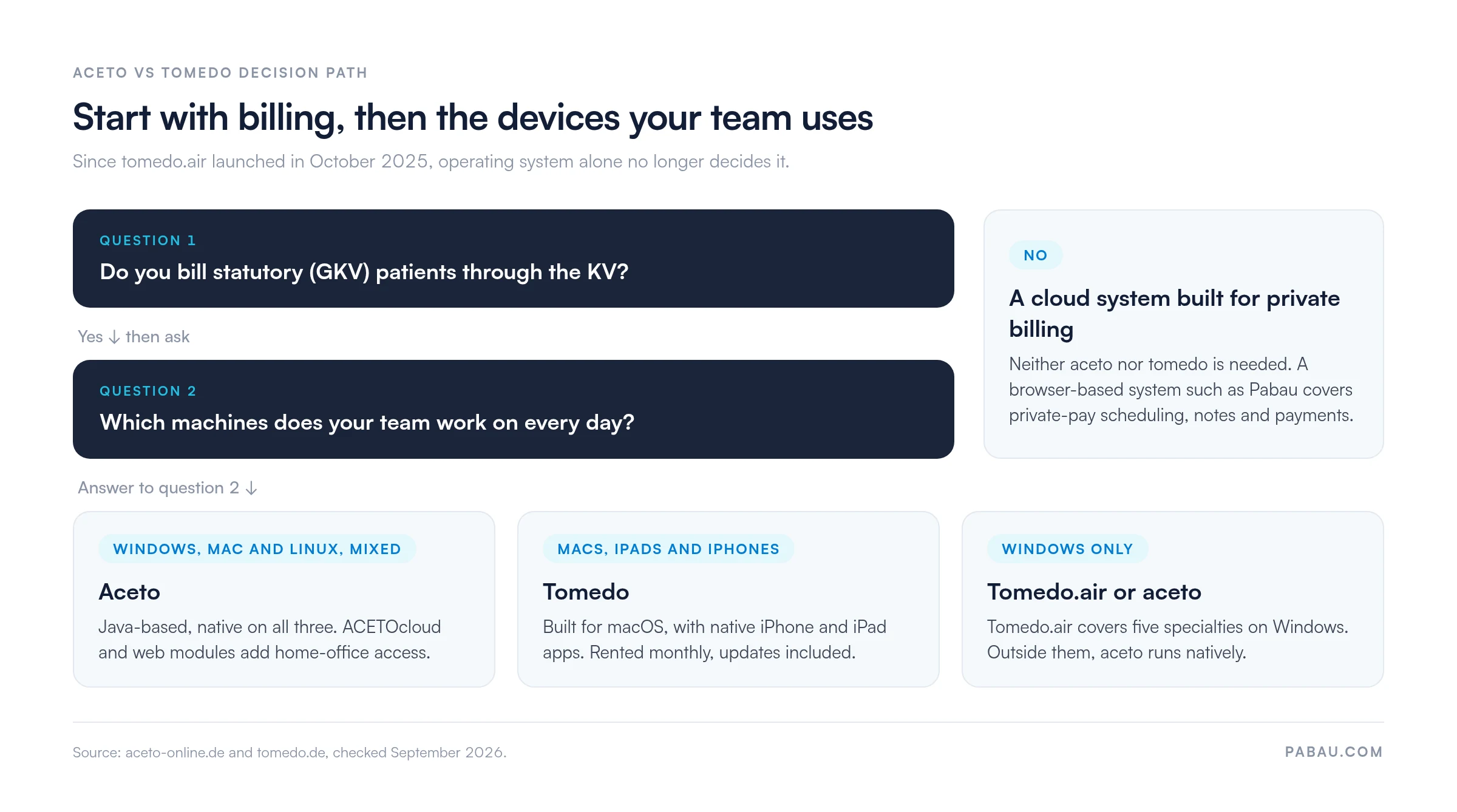
Choose aceto if your practice runs a mix of Windows, Mac and Linux machines. It also fits if you want cloud access from home and local data that works offline. Aceto also suits practices that want patients to complete questionnaires on a tablet.
Choose tomedo if your team already works on Macs, iPads and iPhones and wants native apps on each. It also suits practices that prefer a cancellable monthly rental with updates included. A Windows practice can run tomedo.air, as long as its specialty is one of the five it covers.
Consider Pabau if your practice runs on private-pay services such as aesthetic medicine, wellness or multi-specialty private care. It suits teams that want workflow automation, multi-location management and access from any device, without depending on KV billing.
Pabau doesn’t compete with aceto and tomedo on German statutory billing, and it isn’t built for KV submission. It is built for practices, in Germany or elsewhere, that bill patients directly.
Pabau runs scheduling, charting, intake and payments in one practice management system. Your team works from any browser, with no server in the back office. It also connects to Doctolib, so patients can keep booking the way they already do.
For GP and multi-specialty practices that mix private services with busy schedules, Pabau adds before-and-after photo management, automated treatment recall and injection plotting. Its digital intake forms replace paper consent with forms patients sign before they arrive.
Pabau offers transparent pricing by user count, published on pabau.com, and every subscription includes every feature. For practices that don’t depend on German KV billing, that makes the cost easy to compare before a demo.
If you’re also shortlisting cloud systems from outside Germany, Pabau’s competitor comparisons set Pabau against one vendor at a time.

Pabau puts scheduling, clinical notes, intake forms and payments in one cloud system. Your team works from any browser, with no practice server to maintain.

The Mac-versus-Windows shortcut no longer settles aceto vs tomedo. Aceto runs on every major desktop system and offers ACETOcloud. Tomedo.air brings tomedo to Windows and a German private cloud.
So decide on the contract and the devices your team uses every day. Ask aceto for a written quote, and ask zollsoft whether tomedo.air covers your specialty. Then hold both against a migration plan for the data you already have.
If your practice sits outside the GKV/PKV statutory model, a cloud system built for private billing may serve you better. Book a demo to see how Pabau runs scheduling, clinical notes and patient communication for private-pay practices.

Comparing Pabau with other platforms? Top 15 Pabau competitors and alternatives sets out where each rival system fits and how pricing compares.
Weighing two EHRs for a specialty practice? ModMed vs DrChrono tests both systems against specialty documentation and billing needs.
Want another head-to-head on practice software? Tebra vs eClinicalWorks compares two EHRs on billing, scheduling and fit by practice size.
Aceto is Java-based practice software that runs natively on Windows, macOS and Linux, with an ACETOcloud option. Tomedo is built for Apple hardware with native iPhone and iPad apps, and tomedo.air adds Windows support. Both handle German KV billing for GKV and PKV patients.
Yes, aceto and tomedo both support KV-Abrechnung for GKV (statutory) and PKV (private) billing. KBV certification is required for German practice software that submits statutory billing, and both products are built around this workflow.
Yes, both now offer a cloud route. Aceto combines a local installation with ACETOcloud and ACETOonline web modules, and local data stays available offline. Tomedo runs on a local server, while tomedo.air can run on a local server or in a German private cloud.
Tomedo is rented monthly, with no license purchase, updates included and cancellation at any time. The Server-App and each client app are billed separately. Aceto doesn’t publish its pricing model, so request a written quote and add hardware costs to the comparison.
Setup effort for both depends on practice size and how much data you migrate. The biggest variable is moving records from your current system, so request a migration scoping session from each vendor before you sign.